This year’s end-of-year goody giveaway is a revamped and updated version of our 2020 Happy Holiday Present. This time focused on the migration blockers that will stop you getting to vNext!
What are the Problems?
The number one problem with Db2 system migrations, is the deprecated features that are still firmly nailed to their perches but are 100% dead. They will not cause a problem today, or tomorrow, but at some point they will start to smell … and I mean smell really bad!
Tell me More!
Here’s a list of all the deprecated (and semi-deprecated) items that should be checked and verified at your site:
Use of SYNONYMS
Use of HASH objects
Use of segmented spaces
Use of classic partitioned objects (not using table-based partitioning)
Use of simple spaces
Use of six byte RBA
Use of BRF
Use of LARGE objects (This is semi-deprecated)
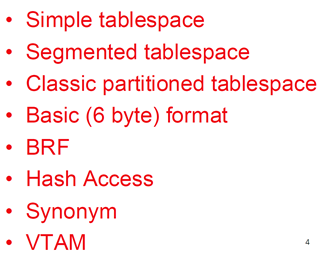
IBM, well actually Haakon Roberts at the IDUG EMEA in 2024, announced a list of deprecated features or functionality that will block migration to Db2 vNext:
This list includes nearly all of the first list and added SNA/VTAM usage.
Anything Else?
Well, yes! You could also check how many empty implicit databases you have and how many empty tablespaces you have while you are checking your subsystem out. While you are scanning, it could also be cool to list out all the Db2 subsystem KPIs, and what about seeing how many tables you actually have in multi-table tablespaces that, at some point, must also be migrated off into a UTS PBG or UTS PBR tablespace?
We do it All!
Our new little program does all of this for you. It runs through your Db2 Catalog in the blink of an eye and reports all of the data mentioned above plus the five deprecated ZPARMs that you should also verify these days!
What does it cost?
Nothing – It is our licensed freeware for 2025/2026 and you only have to be registered on our website to request it along with a password to run it.
How does it look?
Here is an example output from one of my test systems here in Düsseldorf:
Db2 Migration Readiness HealthCheck V1.0 for SD1  V13R1M507 started at 2025-08-27-10.05.32
                    Lines with *** are deprecated features
                    Lines with MMM are migration blockers
                    Lines with XXX are definition errors

Number of DATABASES            :       122
  # of empty DATABASES         :        17
  # of implicit DATABASES      :        65
  # of empty implicit DATABASES:        15

Number of TABLESPACES          :      2216
  of which HASH organized      :         0
  of which PARTITIONED CLASSIC :         0
    # Partitions               :         0
  of which SEGMENTED           :        19 MMM
  of which SIMPLE              :         3 MMM
  of which LOB                 :        63
  of which UTS PBG             :      2115
    # Partitions               :      2115
  of which UTS PBR (Absolute)  :         0
    # Partitions               :         0
  of which UTS PBR (Relative)  :         4
    # Partitions               :        24
  of which XML                 :        12

Number of tablespaces as LARGE :         0
Number of empty tablespaces    :         6
Number of multi-table TSs      :        12
  # of tables within these     :        49
Number of incomplete TS        :         7 XXX
Number of INSERT ALG 0 TS      :      2206
Number of INSERT ALG 1 TS      :        10
Number of INSERT ALG 2 TS      :         0

Number of tables               :      4520
  of which ACCELERATOR ONLY    :         0
  of which ALIASes             :      2164
  of which ARCHIVEs            :         0
  of which AUXs                :        63
  of which CLONEs              :         0
  of which GTTs                :       100
  of which HISTORYs            :         1
  of which MQTs                :         1
  of which TABLEs              :      2170
  of which VIEWs               :         9
  of which XMLs                :        12
Number of tables with Audit    :         1
Number of tables with Data Cap :         2
Number of tables incomplete    :         1 XXX
Number of tables with control  :         1

Number of RLF DSNRLMT__ tables :         0
  of which columns deprecated  :         0
Number of RLF DSNRLST__ tables :         1
  of which columns deprecated  :         0

Number of PLAN_TABLES          :        34
  of which deprecated          :        27 ***

Number of SYNONYMs             :         0

Number of UNICODE V11 Columns  :         0

Number of PROCEDURES           :       116
  of which SQL EXTERNAL        :         0
  of which EXTERNAL            :       109
  of which NATIVE SQL          :         7

Number of FUNCTIONS            :        87
  of which EXTERNAL TABLE      :        39
  of which EXTERNAL SCALAR     :        42
  of which SOURCED AGGREGATE   :         0
  of which SOURCED SCALAR      :         0
  of which SQL TABLE           :         0
  of which SQL SCALAR          :         2
  of which SYSTEM-GENERATED    :         4

Number of Indexes              :      2594
  of which HASH                :         0
  of which type 2              :      2594
    # of partitioned IXs       :         0
    # Partitions               :         0
  of which DPSI                :         0
    # Partitions               :         0
  of which PI                  :         0
    # Partitions               :         0
Number of indexes COPY YES     :         7
Number of indexes COMPRESS YES :         0

Number of table partitions     :      2236
  of which DEFINE NO           :      1024
  of which six byte RBA <11 NFM:         0
  of which six byte RBA Basic  :         0
  of which ten byte RBA        :      1212
Number of TP in BRF            :        17 MMM
Number of TP with COMPRESS Y   :        43
Number of TP with COMPRESS F   :         0
Number of TP with COMPRESS H   :         0
Number of TP with TRACKMOD YES :      2234

Number of index partitions     :      2594
  of which DEFINE NO           :      1324
  of which six byte RBA <11 NFM:         0
  of which six byte RBA Basic  :         0
  of which ten byte RBA        :      1270

Number of STOGROUPS            :         2
Number of non-SMS VOLUMES      :         0

Number of PLANs                :        39
  of which DBRMs direct        :         0
    # of SQL statements        :         0

Number of PACKAGES (total)     :      2697
  of which VALID = A           :        12
  of which VALID = H           :         0
  of which VALID = N           :         6
  of which VALID = Y           :      2679
  of which VALID = S           :         0
  of which OPERATIVE = N       :         0
  of which OPERATIVE = Y       :      2697
  of which OPERATIVE = R       :         0

Old RELBOUND executed packages :         0

Number of PACKAGES (distinct)  :       482

Number of Original PACKAGES    :       278
Number of Previous PACKAGES    :       278
Number of Phased-out PACKAGES  :       271
Total number of PACKCOPY       :       827
  of which VALID = A           :        30
  of which VALID = H           :         0
  of which VALID = N           :         0
  of which VALID = Y           :       797
  of which VALID = S           :         0
  of which OPERATIVE = N       :         0
  of which OPERATIVE = Y       :       827
  of which OPERATIVE = R       :         0

Number of SQL statements       :    109143

LULIST entries found           :         1 MMM
LUMODES entries found          :         1 MMM
LUNAMES entries found          :         7 MMM
MODESELECT entries found       :         1 MMM

ZPARM CHECK_FASTREPLICATION set to REQUIRED is at correct value REQUIRED and Ok.
ZPARM CMTSTAT set to INACTIVE is at correct value INACTIVE and Ok.
ZPARM DISALLOW_SEL_INTO_UNION set to YES is at correct value YES and Ok.
ZPARM MATERIALIZE_NODET_SQLTUDF set to NO is not at correct value YES. ***
ZPARM PREVENT_NEW_IXCTRL_PART set to YES is at correct value YES and Ok.

DDF command prefix -SD10 the IPNAME is not set to "-NONE" and Ok.

Db2 Migration Readiness HealthCheck V1.0 for SD1  V13R1M507 ended at 2025-08-27-10.05.34

Migration to vNext is not possible

Db2 Migration Readiness HealthCheck ended with RC:    4
Note that any MMM will be flagged as Return Code 4 with the message that “Migration to vNext is not possible”
Any line with *** at the end means that you have something to do at some point in the future. The names of all the found objects are written to DD card DEPRECAT so you can then start building a “to do” list. I would start now to slowly “fix” all of these before it is 03:00 in the morning, someone is migrating to Db2 14 FL 608 and it all goes horribly wrong…
What’s Wrong with LARGE?
This is not actually deprecated but any tablespaces marked as LARGE tend to also not have a valid DSSIZE in them. This is fine if you have built a CASE construct to derive the value from the tablespace definition. But what you should do is an ALTER and a REORG to “move” the LARGE to a “proper” tablespace. IBM and 3rd Party Software vendors hate having to remember that ancient tablespaces are still out there!
All on my Own?
Naturally not! For example, after all the ALTERs have been done, a lot of the spaces are simply in Advisory REORG pending status and you could use our RealtimeDBAExpert (RTDX) software to automatically generate the required REORGs to action the changes.
Synonyms???
Well, you can do them all yourself by reading one of my older newsletters – 2016-01 Simply Synonyms in DB2 z/OS – (again) just remember to watch out for the GRANTs afterwards.
That’s a Huge Amount of Work!
Well, there is also a licenced version that creates all the ALTERs, REORGs, RUNSTATS and REBINDs for you – Costs a bit of money, but makes the entire project much easier to handle!
How many Blockers do you have?
I would love to get screenshots of the output at your sites which I would then all sum up and publish as an addendum to this newsletter. Just so that people can see how many parrots we all have pining for the fjords!
This month, I wish to review all the Good, Bad and Very Pretty things that happened in “my back yard” at the 2025 IDUG EMEA in Düsseldorf, Germany. I always really enjoy the IDUGs, where I get to meet all my co-workers, customers and friends from all over the world. All gathered just to learn more about Db2 and chat for a few days! This year, it was held in Düsseldorf, Germany which is where I work, so it was a bit of a busman’s holiday for me… That also meant that the sight-seeing part of going to beautiful cities like Nice, Florence, Rome, Prague, Las Vegas etc. sort of disappeared! Oh well – At least the food and drinks were free!!!
We, SOFTWARE ENGINEERING GmbH, also took along four of our developers to Bathe in the Knowledge of all the Db2 Gurus there. I asked them all after it had finished what they thought:
Just us!
“As a first-time attendee, I can’t say too much because I’ve only been working with mainframes for about five months. But what I saw, is that people are really trying to bring mainframes onto modernization tracks
— for example, using VS Code, SQL tuning tools, cloud technologies, AI, DB2 management tools, and dashboards.
There was a lot of talk about AI — it’s like if you say “AI,” ten more people immediately become interested in your workshop.
I also saw some really good things that I’d love to have on the mainframe — like Zowe, a debugger in VS Code with a tree representation of the source code, and dashboards.
I think young people often skip the mainframe because they believe it takes a lot of time to learn how to work in that environment, and that switching companies or technologies later would be difficult.
I used to think the mainframe was like a big old giant that needed to think ten times before making a move and wouldn’t take a step toward becoming more “modern” — but now I see it can actually become a trend for young people who want to be part of the mainframe world.”
“Attending IDUG for the first time was an amazing experience! I met so many great people, learned a lot from the sessions, and really enjoyed the friendly and inspiring atmosphere.
It was a perfect mix of knowledge sharing and networking—I’m glad I joined and can’t wait for the next one!”
“K3 Women in technology (WIT): Db2’s New Faces: Fresh Talent, Future Perspectives
This was not, as some might have feared, a ladies’ tea party!
Finding new co-workers may involve some of these strategies:
Look for a mindset, not necessarily experience, (you can teach skill but you can’t teach talent)
Mentor your candidates
Keep teaching! Stay curious, keep them curious
Can your company contact local universities about candidates? Or even just show universities that there is a NEED for mainframers?
Make candidates/students work with green screen for a week before giving them a choice of tools
Apparently, there is a European Mainframe Academy?
A203 Workshop – Next Generation Services for Db2 for z/OS Administration and Development – Workshop
Learning how to use Admin Foundation
That Visual Explain looks like it came straight from Netscape times. Considering that I remember those times, I now feel old …”
“Overall, a very worthwhile and interesting IDUG!
The sessions included the “usual” topics such as trends and directions, performance, and Db2 for z/OS utilities updates, etc. from IBM.
Noteworthy, was the continuing trend toward profile tables, including for monitoring Db2 connections, as well as the announcement of further enhancements in the Expert Panel.
The “Real Customer Experiences” from Commerzbank and the SWAT Tales and Personal Experience from Steen Rasmussen were also very interesting; real-life examples are very valuable.
The presentation on how to do Db2 development using Visual Code was exceptional in that it included a live demo that gave a good impression (once you’ve set up the environment) – very good.
Before the last keynote, there was a very entertaining and informative session on quantum computers.”
There you have it! Basically a great time was had by all – You read it here first!
Caveats
Now come my usual warnings and notices:
I did not manage to attend *every* session, but I will do a small write up of each – If that session wasn’t held or the presenter was swapped out – I aplogize!
To access all the presentation files, first open the IDUG website and click on “Events” and select IDUG EMEA 2025 then click on “Access the IDUG Presentation Library” where you must then give your logon credentials as you *must* be a member of IDUG and logged in, otherwise you will *not* be able to download the files! Once logged in, click on “Collections” to see the six different tracks and then simply download the presentations that grab your interest.
Starting at the Start with Track A Db2 for z/OS:
01 Haakon Roberts Trends and directions (No download available yet!) Haakon doing his usual great “pep” talk about where we are, and where we are going, without saying the number 14. Just remember the deprecated stuff that will stop you going there! Visit our web site and download our free software MigrationReadiness HealthCheck to find out all the blockers – way before they cause you any grief!
02 Db2 13 for z/OS Experience with New Features for Availability, Resilience and Performance with the great John Campbell. I missed this one, of course, because I was in the next room holding my presentation. I heard it was the usual great stuff though! John also mentioned my personal bug bear with page-level sampling on slide 14…
03 Db2 13 for z/OS: Five Key Features to Drive Performance and Innovation with Preetham Kannan. The highlight for me, was the Package Validity at Statement level and the lively discussion around this point! He reminded us all that Autobind Phase-In is also a game-changer!
04 The latest Db2 13 Online schema evolution and application performance enhancements with Frances Villafuerte. Frances started off with a brief history of tablespaces and how to easily migrate to UTS, as all other forms are nailed to their perches and will soon cease to be! Then she went through why to move from PBG to PBR. Further, the idea of ROWID as a hidden partitioning key completely hidden from the application was discussed before then going through the back-flip of PBR RPN to PBG! She finished off with a very nice explanation of why IAG2 can be good for you!
05 Db2 Analytics Accelerator: product updates, new version V8, and experiences from the customers with Cuneyt Goksu and Björn Broll. This was all about whether or not your workload may benefit from having an Accelerator or not, using the Workload Assessment via SMF data. Then they compared the two flavors on IBM Z or on LinuxONE before show casing the improvements with z17 and IDAA Version 8 review. Including very nice, flashy orange lines… pretending to be LOB data, I think! Then green lines appeared as data was cloned directly from IDAA to IDAA nice AOT (Accelerator Only Tables) data!
06 Optimizing SQL Pagination in Db2 for z/OS for Performance Gains from Emil Kotrc. A very entertaining walk down the history of paging forwards and backwards. Sounds simple, but actually it is a real minefield! Db2 has got much better, but there are still things you gotta watch out for and take care of, especially mixing multi-row and normal fetch, by accident normally, and OFFSET. A very good presentation indeed. (Yes, you guessed it, I was in this one and so was Joe!)
07 Db2 13 latest real customer experiences – new functions, best practices and some more… from Ute Kleyensteuber. Another goodie-filled presentation all about Db2 13, and a sneak peak of the FL508 stuff that was actually released on the 28th October. Temporal support for the _AUTH tables came in with Db2 13 FL505. REORGs with DISCARD and a SECADM user id will be required!! Last Used for PLANs finally arrived as well in Db2 13 FL507 but watch out for invalid date formats… Then she detailed a year’s history of FTB usage and the new Image Copy ZiiP CPU savings at 55% – 60%! Ended up by giving us a nice sneak peek at the correct solution to split work file usage…
08 Db2 z/OS Dynamic SQL Monitoring: Best Practices from Michal Bialecki. He explained everything you ever wanted to know, but were afraid to ask, about Dynamic SQL! At the end is the link to the AHA idea 1796 – Please go and vote for it!
09 Modern System and Application monitoring: THE POWER OF DATA at Garanti BBVA with Hakan Kahraman and Toine Michielse. This was a deep dive into collected data from various sources. Lots of redacted graphics towards the end!
12 Db2 for z/OS Utilities: Unveiling Recent Updates and Current Developments with Haakon Roberts. Haakon ran through all the recent updates to the IBM utils, including APARs, for Db2 12 & 13 where required or even an FL required. RBDPM, for example. He then rounded off with a glimpse into the future…
14 Tools Maintenance Our Way with Martin Ålund. This is with notes! Here he describes the methodology to maintain your utils! Lots of SMP/E stuff – and scroll past the last page for some handy JCL for SMP/E Backup and Restore!
15 Billions of XMLs: How Do You Manage That? from Philip Nelson – a brief intro to why and what of XML and then off down the rabbit hole that are the differences between “normal” data and “xml” data in the z/OS context. UNLOAD/LOAD > 32 KB – nasty. Xpath index lengths – nasty. Load from cursor fails with XML – nasty. Reorg Discard fails with XML – nasty. However, he shows you work-arounds for nearly all of these!
16 All about the Db2 Log: Updates, Commits, and Best Practices for Data Integrity from Emil Kotrc. A full explanation of what is actually LOGged, and why, plus who uses it anyway? Then off to DSN1LOGP usage and physical structure of log records. Then, repeating what we have very often heard: COMMIT, COMMIT, COMMIT! Lastly, a run through ZPARMs and messaging.
17 Claims, Drains and Automobiles: How Db2 Keeps Order in a Chaotic World with Marcus Davage. Here, Marcus took us on a voyage of discovery, all about the silent policemen who steer & control our data to do their thing! An excellent intro and overview of this, very often misunderstood, group of functions! Also included speakers notes as free extra bonus on the Blu Ray edition.
Track B Db2 for z/OS
No B01 as A01 is always parallel to it. We start therefore with:
02 RUNSTATS Master – reloaded, from my very good self! Learn all you ever wanted to know about RUNSTATS, and probably some you do not want to know! Contains a handy single slide look-up for all Optimizer used stats from the Db2 Catalog as a free bonus! Full of notes that all got sadly chopped by the upload to the IDUG server…
03 Key Performance Updates, z Synergy and Best Practices for Db2 for z/OS from Akiko Hoshikawa. Akiko doing her usual great stuff! z17 highlights, DS8K G10 highlights, Db2 13 Performance updates of course! This included the IRLM Lock Structure Rebuild boost, then the “hidden” CDDS feature that can now be used by everyone! Open Telemetry support also for RESTFul.
04 Taming Page Splits: Reduced Stress for DBAs in Db2 13 from Saurabh Pandey. B-Tree for beginners, and then a full discussion of the how and why of index page split leading to deeper, wider indexes. Even with asymmetric split still a lot of work especially if the split goes up the branch to the root causing a new level to be made! All of the logged pages are synchronous log writes (Enforces write-ahead logging!) Basically IFCID 396 and the new columns in RTS in Db2 13 FL501 are there to help!
05 Build a lightweight monitor to identify SQL workload tuning potential from Kai Stroh. This session showed how you can roll your own Db2 DSC monitor and how to use it to see if you have SQL problems – As we all do!
06 Db2 Under Siege from David Lea and Marcus Davage. All about cyber threats, how to protect yourself and how to recover in the worst case. Slides 16 – 18 are a classic list!
07 Mastering Access Path Management in Db2 for z/OS: Simplify, Optimize, Succeed from Denis Tronin. All about access path, EXPLAIN and its very many varied tables, use of Catalog stats, RUNSTATS, the two FEEDBACK tables and use of the BIND/REBIND control parameters APREUSE and APCOMPARE. For Dynamic SQL there are stabilized Dynamic SQLs. He then rounded off with a list of HINT methods. Very interesting indeed!
08 Db2 for z/OS all new “2025 SWAT Tales” from Anthony Ciabattoni. As always, a wonderful run through various things that might have saved ya from a serious problem! REBIND parameters, Statement level invalidation and then a nice list of things that are good for us, like recovery boost at IPL or Db2 Log sizing & management.
09 Protecting your Db2 for z/OS Environment from Cyber Attacks from Patric Becker. Ransomware and how Cyber Security and Cyber resilience can help you. Then all about Cyber Vault Immutable copies and either Surgical recovery or… Catastrophic recovery. You will require more storage though!
10 Partitioning Update from David Simpson. A quick run through the various deprecated TS types and then onto the different partitioning methods, including the differences between PI, DPSI and NPSI. Then a review of the PBR RPN and some example SQLs to review what you actually have, and finally, how to migrate to and from UTS spaces.
11 Personal Experience: 40 Years of Battle Scars from Managing Db2 for z/OS from Steen Rasmussen. Steen’s usual, very entertaining, round-up of 40 years of fun at the front! I loved slides 29 and 31 the best!
12 In memory table: What did you Expect? from Laurent Kuperberg. (I got a name check in this presentation!) This was all about configuring your BUFFERPOOL size to get a memory table. Why do it? How to do it? and Is it worth it? Spoiler alert: Yes, but not for all tables!
15 Who is in Your Db2? Auditing z/OS Like a Mainframe Maestro from Joern Thyssen and Christoph Theisen. Another Auditing session all about the stuff we must all do…Lists out all the IFCIDs and CLASSes you should look into – Like our very own WorkLoadExpert Audit Use Case for example! Also includes a nice section all about Audit Policies.
16 ISBANK’s Journey to implement CDC IIDR Remote Capture with a Resilient Architecture from Önder Çağatay and Gülfem Öğütgen. A very in-depth presentation about how their bank has implemented this solution and why they did it.
17 Automating Excellence: Real-world z/OSMF Workflows for Efficient Provisioning and Maintenance (a Db2 use-case) from Josiane Rodrigues and Kumari Anjali Maharaj. This was all about z/OSMF – Why they did it, who they did it with, and how it hangs together, especially for Db2 using VSCODE Workflows4z.
Track E “Themes I”
03 Db2 Universal Translator between z/OS and LUW from Dale McInnis and Jerome Gilbert. This was basically a side-by-side comparison of Db2 for z/OS and LUW. Contains everything about both systems. Very interesting indeed, especially the z / Common / LUW slide 35 and the Conclusion on 50.
04 Fear no Threads: Secure and Monitor Db2 Connections with Profile Tables from Toine Michielse. This was a very nice run through all the stuff that PROFILE tables now give us and how to use it to master DDF problems. New in Db2 13 was the ability to control/change local connections. A game changer for RELEASE(DEALLOCATE) and RELEASE(COMMIT) changes for example. The profile support for modelling ZPARMS, slide 14, is not 100% complete and you can go and vote/review my Aha Idea about this “DB24ZOS-I-1781 Complete PROFILE support for SQL tuning ZPARMS” Currently denied but I have no idea why!
06 Automating and operationalizing data-driven AI with Db2 SQL Data Insights – new APIs for full control from Steffen Exner and Christian Lenke. AI rears its head in Db2 for z/OS… It definitely has its uses and it will get better and better I am sure. This covers all you need for the tricky bits of authentication. Pro tip: Do not use Db2 UID/ PWD as clear text! Not even in test!!!
07 Transforming your Db2 image Copies to Data Pipelines for Generative AI from Mikhael Liberman. With notes!! This follows on from E06 and delves into the Hows and Whys of data trustworthiness etc. Basically, structured data is much better for learning – No real surprise there! And what do we tend to have on Db2 for z/OS? Structured data! Sadly, the presentation got really ruined by the Monday Morning “quick transform” but it is still readable…
08 Deep Dive Into SQL Data Insights from Thomas Baumann. Now we dive into real world of Db2 SQL Data Insights usage at Swiss Mobiliar with Thomas. Great stuff indeed! SQL examples of all the functions and real-world examples and walk-throughs of doing all the work. Essential reading if you wish to start with SDI! Ended with another use case of Bufferpool allocation types.
09 Unlocking the Power of AI with Db2 for z/OS from Akiko Hoshikawa. Yet more AI for you! Including the reveal that the next version will also be able to use IDAA for Vector Tables, and that the next version might well recommend Index and Runstats. System assessment and Performance insights explained in depth, and use of the Best Practices dashboards as well.
10 A Deep dive into Db2 Connect Best Practices from Shilu Mathai. Absolutely everything you will ever want to know about Db2 Connect – and with Notes! Included three slides just listing the different versions and how to bind the packages – very handy!
11 The Db2 for z/OS Agent Lets have a Chat with the Catalog! From Daniel Martin with notes! This is all about the IBM Db2 for z/OS Agent that is an AI powered “teammate” for troubleshooting and collaboration.
12 Mastering SQL Performance on IBM Z Analyzing and Optimizing Queries for Maximum Throughput from Saurabh Pandey. A great guide into how and why SQL does its thing and then goes on into EXPLAIN territory before branching off into all different types of access that Db2 uses.
14 The Ins and Outs of High Performance DBATs from Bart Steegmans and Gareth Copplestone-Jones. Another excellent presentation telling you absolutely everything you need to know to decide when and how to implement High Performance DBATs. It starts with a very nice description of what a DBAT is, with a full discussion of terms and meanings – useful stuff! Then introduces High Performance DBATs with slide 13 summing up implementation. A very important, and often completely forgotten/ignored, point about WLM Velocity goal changes for HPDBAT workloads is on slides 36 and 37.
15 Achieving Resilience with DORA and Db2 Tools: Enhancing Operational Continuity and Compliance from Julia Carter and Jose Arias. Ahhh! I love Audit!!! A run through everything you should be doing by now! One tiny point where I disagree, is on slide 26 where EXTSEC set to YES. I actually recommend NO, as YES gives away Db2’s existence in an attack. Better not to give the hacker any feedback at all and live with the fact that an end user cannot change the password using DRDA (Which I think is better anyway – Password changes should be centrally controlled!). Bottom line is: we all must do more, really…
Track F “Themes II”
02 Strategies for Making Db2 Data Accessible with APIs from Chris Crone. All about REST APIs and also with notes! A ton of info with examples galore about RESTful APIs – The Wall of Inefficiency will stay with me for a while!
04 Db2 z/OS in a Hybrid Cloud – A Survey of Architecture Options across AWS, Azure, Google and IBM Cloud from Daniel Martin. Another presentation with notes – I think Themes II is winning on this front! Shows you different way of storing your data off-premise and in a cloud – Plus and Minus points for all variants but leaning towards IBM of course 🙂
05 Db2 Joins In Depth from Tony Andrews. Full of notes, as I expect from Tony! Also full of JOIN info and predicate details. Essential reading for all SQL coders! Towards the end (Slides 43 and on) are some great Sparse Index explanations.
06 A day in the life of an MFA enabled DBA from Jørn Thyssen. This is all about understanding and using MFA for all your normal day-to-day work. MFA is ubiquitous and we must all use it nowadays – just due to Audit requirements. Jørn takes us through it all – History of passwords on z and the introduction and integration of Passtickets. Then into the brave new world of certificates… shudder… Then, for z/OS Developers, a couple of useful hints and tips on slides 48 to 51 are well worth reviewing!
07 Route to the roots…DSNZPARM from Manuel Gómez Burriel. A presentation which reviews and recaps some of the 300+ ZPARMs we have heard of and some forgotten! REALSTORAGE_MAX is an interesting candidate. Included are SET SQL commands that override IRLM (ZPARM) settings as well!… danger…
08 Tales of a DBA with Stored Procedures and UDFs from Soledad Martinez. She takes us through the whole Functions and Procedures methodology including trouble shooting and Migration. Handy tip for setting STAY RESIDENT NO in DEV but YES in PROD. Nice nod to the IVP DSNTEJ2U as well – Showing you how you can create your own nifty UDFs! Slide 51 is a handy xref for NUMTCB setting as well.
09 Modernize Db2 for z/OS Development with VS Code with Scott Davidson and Brian Jagos. The brave new world of GUI is charging headlong into the green screen crowd! We have to join the throng of VSCode people sooner or later – Better is sooner! Lots of side bar notes and then it ends in a great demo that obviously does not work in a PDF!
10 How to access Db2 for z/OS (and other Z oriented) data in the cloud from Cuneyt Goksu. All about where data can live and be secure and useful. Basically, stating that the application coders just using RESTful services no longer need to know, or even care about, where their data is, or even who is holding it! It is just “plumbing”…Adding IDAA into the mix also for “legacy” VSAM and IMS data is also a winner!
12 Enhance Performance with Db2 Multi-Row Processing from Chris Crone. Yet another great practical presentation all about multi-row coding. From first principles and examples, with test results as well. Spoiler alert – about 100 is the sweet spot! 🙂
14 Create Stored Procedure to ‘ReorgTable’ including table function for Select Reorg() and REST-Services from Veit Blaeser. The ability to let developers, just by single clicking a line in an excel table, fire off a REORG – Scary stuff, but great in test! Full of notes and example code but the last line of slide 25 is legend! (plus the note text!). Using this and the other REST/UDF presentations together gives you a very good cook book for doing a ton of things automagically! Slide 40 then gets pretty metaphysical…
15 Modernizing Db2 for z/OS System Management with Ansible from Marcus Davage. Once more dragged kicking and screaming into the harsh modern world! Includes notes though…and demos…
16 Pedal to The Metal – this is not your Daddy’s Accelerator! From Adrian Collett. A brief history of Accelerators and then all the new stuff and what you can do on them nowadays. Includes doing a self-assessment to see if it would help you (It will!) Then a whole bunch of real-world examples.
In Conclusion
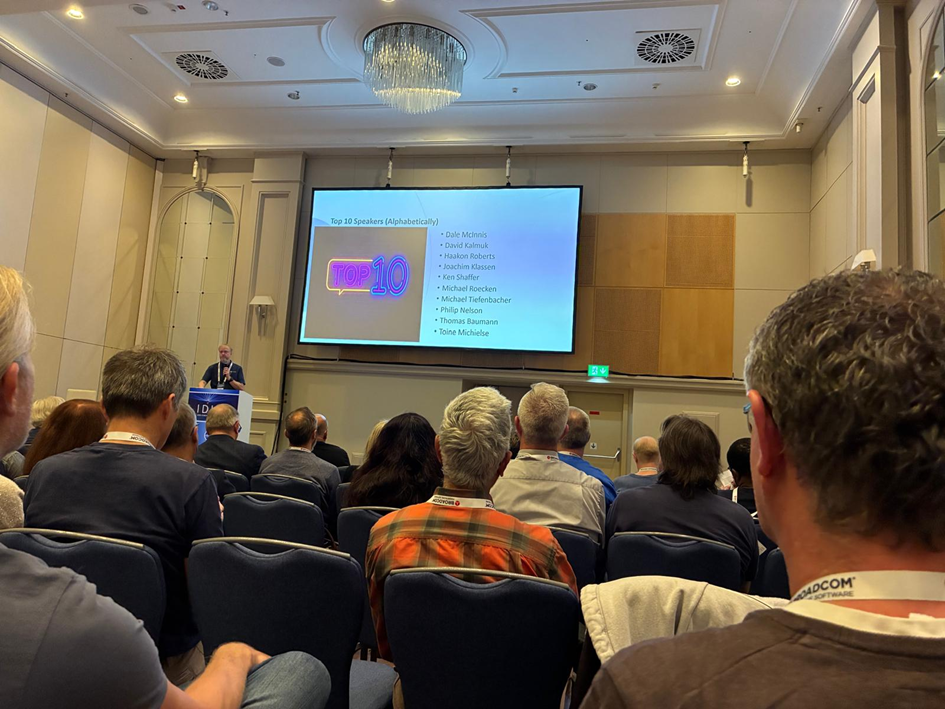
Over 450 people, it was busy and I had a great time!
My name has obviously just slipped off of the bottom due to font problems… <cough> <cough>
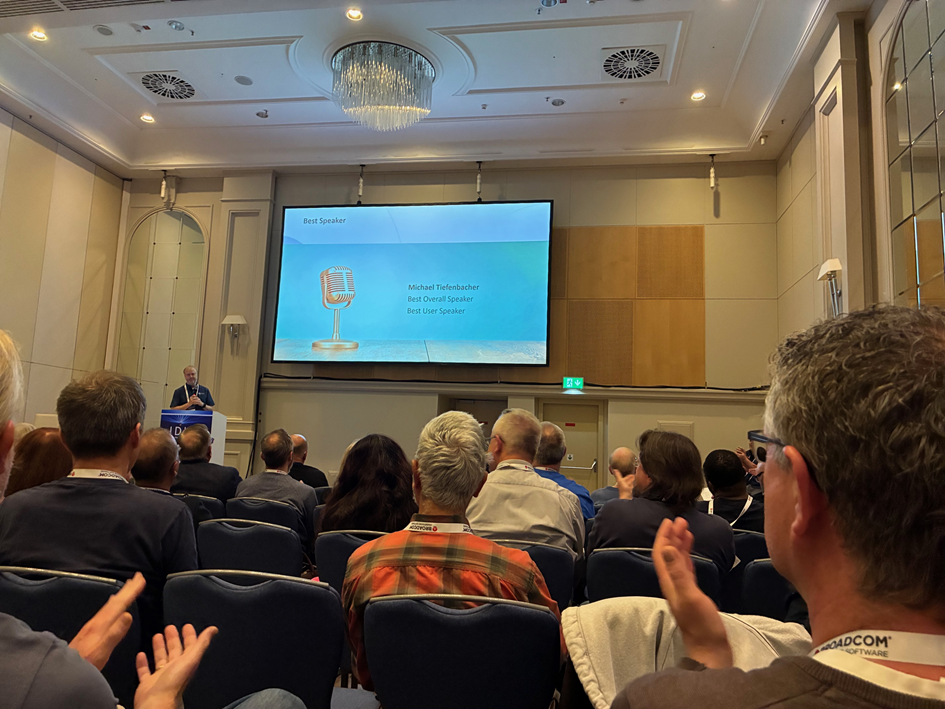
and the winner was….
Congrats to all of the Speakers and many, many thanks to all the “behind the scenes” Guys and Gals that make an IDUG even possible, from the IDUG Staff to the Moderators and Speakers to the Sound and Lighting people. It really takes a lot of people to pull it off.
I hope you enjoyed my little review. Next month is our Happy Holiday Present Edition of my monthly Newsletter, with our traditional end-of-year-goodie, so stay tuned, folks!
This month I wish to wander through the various types of data that Db2 squirrels away for our use. One of my favorite tables is the SYSPACKSTMT where, like its name suggests, every statement for every package is stored away. Within are a couple of very interesting, for me anyway, columns: STATUS and EXPLAINABLE.
Private Property!
First rule of SYSPACKSTMT is that any row where SEQNO, STMTNO and SECTNO are all equal to zero is internal for IBM use and must be ignored from all investigation or further use! In other words, the SQL must always look a little like this:
SELECT PS.* FROM SYSIBM.SYSPACKSTMT PS
WHERE NOT (PS.SEQNO  = 0
       AND PS.STMTNO = 0
       AND PS.SECTNO = 0)
  AND PS.EXPLAINABLE = ' '
LIMIT 5000
;
What’s in a name?
Starting with EXLAINABLE – It is what it says on the box! If the statement can be used with the EXPLAIN statement, and I sincerely hope *all* of your production SQL has been explained at BIND/REBIND time dear readers, then this column has a “Y”. If, on the other hand, it is not EXPLAINable then you simply get an “N” in it and if it was last bound prior to Version 7 it will contain a Blank – I also really hope that none of your in-use production packages has a blank in it…
Filter it down…
This is a useful column to filter your SQL in this table. Basically, the logic here is that any SQL that is EXPLAINable does stuff that you, as a DBA, can check or alter. Otherwise, you cannot really affect it at all with normal means. An example is a FETCH Cursor statement. You cannot “tune” these, your only chance is in the cursor declare that the FETCH is using. Further simple examples are COMMIT and ROLLBACK – Very nice to know that your code is doing COMMIT and ROLLBACK but nothing to see here – move along please!
Sub-optimal docu ahead!
Ok, here’s the first bit of info… The docu is not really being honest with you when it states “Blank means last bound prior to Version 7.” and it also contains the text for QUERYNO – “If -1 this statement was bound before Version 7.” These are not 100% true, what it really means is “or is a non-standard package”. What you must do is *also* ignore the rows where SEQNO = 1 if the TYPE of the package is a “N”, “F” or “T” (“N” is a Native SQL routine package, “F” is a compiled SQL scalar function and “T” is a Trigger package). Further for Advanced Triggers you must also ignore all rows with a 2 in SEQNO as well!
How does it look?
So now you have this SQL that should only find all really non-explainable SQL, it still finds esoteric weirdoes but in my test installations they are really only ROLLBACK and COMMIT within Native SQL routines!
SELECT SUBSTR(PS.COLLID   , 1 , 18) AS COLLID
     , SUBSTR(PS.NAME     , 1 ,  8) AS NAME
     , PS.CONTOKEN
     , PS.STATUS
     , PK.BINDTIME
     , PK.TYPE
     , PK.VALID
     , PK.OPERATIVE
     , PK.VALIDATE
     , PK.HOSTLANG
     , PK.REMOTE
     , PK.REOPTVAR
     , PK.LASTUSED
     , PS.STMT_ID
     , PS.QUERYNO
     , PS.EXPANSION_REASON
     , PS.STATEMENT
FROM SYSIBM.SYSPACKAGE  PK
    ,SYSIBM.SYSPACKSTMT PS
WHERE PK.LOCATION = PS.LOCATION
  AND PK.COLLID   = PS.COLLID
  AND PK.NAME     = PS.NAME
  AND PK.CONTOKEN = PS.CONTOKEN
  AND PS.EXPLAINABLE = ' '
  AND NOT (PS.SEQNO  = 0
       AND PS.STMTNO = 0
       AND PS.SECTNO = 0)
  AND NOT (PK.TYPE IN ('N' , 'F' , 'T' , '1')
       AND PS.SEQNO  = 1
       AND PS.STMTNO = 0
       AND PS.SECTNO = 0)
  AND NOT (PK.TYPE = '1'
       AND PS.SEQNO  = 2
       AND PS.STMTNO = 0
       AND PS.SECTNO = 0)
ORDER BY 1 , 2 , BINDTIME DESC
LIMIT 5000
;
It’s a matter of STATUS
Once you have studied all your EXPLAINABLE = ‘ ‘ rows we can then move on to “the meat and potatoes” of this month’s newsletter! What are all the different STATUS column values and what do they actually mean?
blank The statement is non-executable, or was bound in a Db2 release prior to Version 5.
A Distributed – statement uses Db2 private protocol access. The statement will be parsed and executed at the server using defaults for input variables during access path selection. [This was deprecated in DB2 V9 and dropped from support in DB2 10.]
B Distributed – statement uses Db2 private protocol access. The statement will be parsed and executed at the server using values for input variables during access path selection. [This was deprecated in DB2 V9 and dropped from support in DB2 10.]
C Compiled – statement was bound successfully using defaults for input variables during access path selection.
D Distributed – statement references a remote object using a three-part name. Db2 will implicitly use DRDA access either because the DBPROTOCOL bind option was not specified (defaults to DRDA), or the bind option DBPROTOCOL(DRDA) was explicitly specified. This option allows the use of three-part names with DRDA access but it requires that the package be bound at the target remote site.
E Explain – statement is an SQL EXPLAIN statement. The explain is done at bind time using defaults for input variables during access path selection.
F Parsed – statement did not bind successfully and VALIDATE(RUN) was used. The statement will be rebound at execution time using values for input variables during access path selection.
G Compiled – statement bound successfully, but REOPT is specified. The statement will be rebound at execution time using values for input variables during access path selection.
H Parsed – statement is either a data definition statement or a statement that did not bind successfully and VALIDATE(RUN) was used. The statement will be rebound at execution time using defaults for input variables during access path selection. Data manipulation statements use defaults for input variables during access path selection.
I Indefinite – statement is dynamic. The statement will be bound at execution time using defaults for input variables during access path selection.
J Indefinite – statement is dynamic. The statement will be bound at execution time using values for input variables during access path selection. [Not documented, but I believe these entries are all the same as I entries but with REOPTVAR = ‘Y’.]
K Control – CALL statement. [Not really CALL statements here!]
L Bad – the statement has some allowable error. The bind continues but the statement cannot be executed.
M Parsed – statement references a table that is qualified with SESSION and was not bound because the table reference is for a declared temporary table that will not be defined until the package or plan is run. The SQL statement will be rebound at execution time using values for input variables during access path selection.
O Compiled for acceleration. The static query was bound successfully for acceleration and will be routed to an accelerator when executed.
Show us the data!
Let us re-write this SQL this time with the EXPLAINABLE negated and adding in a limiter to drop all the “DSN%” stuff as we are not really interested in all the IBM packages:
SELECT PS.STATUS,
       COUNT(*)
FROM SYSIBM.SYSPACKAGE  PK
    ,SYSIBM.SYSPACKSTMT PS
WHERE PK.LOCATION = PS.LOCATION
  AND PK.COLLID   = PS.COLLID
  AND PK.NAME     = PS.NAME
  AND PK.CONTOKEN = PS.CONTOKEN
  AND NOT PS.NAME LIKE 'DSN%'
  AND NOT PS.EXPLAINABLE = ' '
  AND NOT (PS.SEQNO  = 0
       AND PS.STMTNO = 0
       AND PS.SECTNO = 0)
  AND NOT (PK.TYPE IN ('N' , 'F' , 'T' , '1')
       AND PS.SEQNO  = 1
       AND PS.STMTNO = 0
       AND PS.SECTNO = 0)
  AND NOT (PK.TYPE = '1'
       AND PS.SEQNO  = 2
       AND PS.STMTNO = 0
       AND PS.SECTNO = 0)
GROUP BY PS.STATUS
ORDER BY PS.STATUS
;
From my little test system, I get a nice smattering of values:
---------+---------+---------+---------+-----STATUS
---------+---------+---------+---------+-----
              27822
C             99838
H              3210
I             63355
J                23
K                 6
M              2346
DSNE610I NUMBER OF ROWS DISPLAYED IS 7
Break it down!
I have 27822 Blank entries none of which were bound before DB2 V5! They are COMMIT (2914), CONNECT (778), DECLARE (21574), RELEASE (72), ROLLBACK (517), SET (66) and WHENEVER (1901) statements. All of the WHENEVERs are old code as I have removed all WHENEVER usage from our code base.
Naturally no-one should ever have A and B values anymore as they were deprecated in DB2 V9 and removed from support in DB2 10 (It was the DBPROTOCOL(PRIVATE) BIND/REBIND option if you want details)
C is where for a static shop most package statements will be found and you can see that it has the Lions share in my test system.
I have no three-part name usage, no EXPLAINs embedded in programs, no failed binds with VALIDATE(RUN), no bad SQL and also no Accelerator so no D, E, F, L or O status values.
The H‘s are CALL (124), CLOSE (659), DECLARE (830) Including DGTTs, FETCH (796) and OPEN (708). Naturally at BIND time there is nothing to do and so they all get marked with an “H” for Run time. There are also 93 “normal” SQL Statements here SELECT, INSERT, UPDATE etc. which should trigger a check to be done! In my case I know they are all for test cases and so all can be happily ignored.
I is our bread-and-butter – SQL Dynamic SQL ready to be prepared and run. I have CLOSE (4095), DECLARE (12810), DESCRIBE (68), EXECUTE xxxx (11829), EXECUTE IMMEDIATE (526), FETCH (12084), OPEN (4081) and PREPARE (17862).
J, for me at least, is just Assembler EXECUTE IMMEDIATE (23) statements all with REOPTVAR = Y.
K are all NULLID collection SYSSTAT statements all to do with FREE LOCATOR and SAVEPOINT statements with REMOTE = Y. No CALLs at all…
M is all of our SESSION table usage so we have DECLARE (530), DROP TABLE SESSION.xxxx (330), INSERT INTO SESSION.xxx (716), SELECT from SESSION.xxxx (435) and UPDATE SESSION.xxxx (335). This data is also filled if someone has decided to be evil and created a table with the CREATOR “SESSION”. It is not documented anywhere but then it is assumed by Db2 that it is a transient table and all package SQL ends up here as well – This is probably not what the application designer was thinking of and is *not* recommended for normal use! If you find any “normal” table usage here you have trouble brewing! On the other hand, it could be an extremely clever way of getting REOPT(ALWAYS). As an extra bonus/problem any SQL referring to SESSION tables (Including erroneously defined ones) also never makes it into the two Db2 caches!
IBM Use as well?
If you check the “DSN%” packages as well, then you will also see two G Status entries for DSNTIAUL where it is looking up the DEFAULT value for a ROWID column in a table. I am guessing that DSNTIAUL needs this to see if the DEFAULT is “A” – ROWID is GENERATED ALWAYS or “D” – ROWID is GENERATED BY DEFAULT.
Trust is good – Control is better!
The ones to control are the H non-standard records, the unexpected J entries and the M entries especially if the table is not really a SESSION table!
H like Hotel
Sounds like a dodgy Hotel to me! Sometimes rogue SQL makes it to production or you have very old packages hanging around and, in both cases, you can get H status records. In nearly all of these cases a DROP of the package cures the “problem”.
J like Juliett
What about poor smitten Juliett? Re-optimizing at every prepare, basically ignoring the DSC, can get ridiculously expensive and so these must all be checked to see “why?” and “How often?” Do they really need this functionality? In 99.99% of the cases probably not – It is only costing you every second time and onwards that they run for almost certainly no real benefit and should all be changed to be REOPT(NONE)
M like Mike
And as for Mike… Well, the mini-bind that happens every time does cost you CPU and elapsed time and if it can be reduced by, for example, the creation of a CREATE GLOBAL TEMPORARY TABLE xxxxx (CGTT) instead of a DECLARE GLOBAL TEMPORARY TABLE xxxxx (DGTT). This can be a real game changer. The differences in handling are small but very important to know between a CGTT and DGTT. Here is a great blog from Brian Laube on the IDUG web site all about these.
Well worth a read! After you have read this and reviewed your workload you can then action a plan to move from CGTT to DGTT or vice versa! As always, your mileage may vary, the cheque is in the post and It Depends!
This month I wish to run through a bunch of, sadly, pretty common SQL coding mistakes that lot of beginners fall into. Not just humans either! AI is increasingly generating code snippets which developers simply cut-and-paste in the hope that it is:
Correct SQL
Does what they want it to do
Runs acceptably fast!
In the Beginning was the SELECT
So, let us begin with the number 1 mistake all coders make at some time or other:
SELECT * from mytable ;
Yep, SELECT * FROM mytable. We have all done this, and in SPUFI it is the absolute norm! But if you are coding SQL that must run fast it is deadly… Why?
You are *never* alone in this world and that is doubly true of SQL running on big iron. Think buffer pools, think work space, think FTB etc. RAM is cheap these days, but if it is all being used it is no good to anyone else! The reason I mention space here, is when you code a SELECT * you are, pretty obviously, selecting every single column in the Table, View, MQT etc. This is pretty clearly going to cost you in CPU and I/O as Db2 must access every column in every row, format it, and return the value.
It gets worse, of course, as we live in a buffered world. All of this data is read and written into your precious little buffer pools and also is externalized into your darling little sort work spaces… You get the idea! Every column extra you add to the SELECT adds to the colossal amount of storage and cpu you are using. It gets even worse: If the optimizer sees this, it will sometimes, and pretty often, switch off using an index as it thinks “Well, I gotta get back every column value so an index might not really save cpu here!” Whereas a SELECT with just the three columns you really want, which also happen to be in an index, will then tell the Optimizer: Just scan this small, in comparison, index dataset! The savings can be vast.
It gets still even worse, of course… Coding a SELECT * in static or dynamic SQL will require a code change whenever you add or remove a column, as the cursor and/or program *is* aware of the columns and types of data being returned. Failure to do so is very bad news indeed!
Interesting little fact: Removing a column and then running with SELECT * will not actually cause a run time error (A negative SQLCODE), but it will cause you to possibly select garbage into fields. It is one of my pet bug bears that you can always have more columns on a FETCH than on a SELECT and Db2 does not warn or tell you!
Bad Index Usage
Using functions on columns tends to kill index access outright. If you can code around it – super! If you cannot then an IOE (Index On Expression) might be your only hope. No one likes IOEs though… The expression used must match 100% to the expression in the SQL and so for UPPER or LOWER it is not a problem but for SUBSTR(COL3 , 1 , 5) and SUBSTR(COL3 , 1 , 4) it will fail – and not tell you that the IOE was there but was not a 100% Match. EXPLAIN is naturally your friend here!
Missing Index Columns
Another absolute favorite of programmers is forgetting a join column… We have all done it, and so I am not going to throw the first stone here, but if you have two tables, both with four column indexes all with the same column names and/or functional content, then when you EXPLAIN and it joins with just one or two columns – Alarm bells should start ringing. Sometimes it must be like this but most times a JOIN / WHERE predicate has simply fallen under the table – These can be evil little problems, as sometimes the cardinality of the missing column is one so the returned data is all perfect… Nasty! Here our SQL PerformanceExpert for Db2 z/OS (SPX) software can really help out with the hunt!
Cartesian Join
If I had a Euro for every cartesian join I have seen in production I could retire! The major problem here, is sometimes you do not even see it, and sometimes the tables are so small the results are still OK. So these little problems fall under the radar until one day, that single row table you are mistakenly *not* joining to, grows up into 1,000,000 rows and then your little SQL just grinds to a halt, sucking the whole system down with it! These cartesian joins are sometimes caused by SQL changes where a programmer removes a JOIN to a table and accidentally deletes one row too many in the code. The syntax is still fine, the query might still run fine – especially in test – but then that little table grows… Boom! Here you need to use EXPLAIN, like in the index query, to see *exactly* how the Db2 Optimizer is actually joining all the tables. If you are using SYSIBM.SYSDUMMYx style tables, then you can sometimes want, and even expect, a cartesian join as you are 100% guaranteed to not ever have more than one row in that table! In all other cases, you had better make sure that there are correct JOIN … ON or WHERE criteria to avoid this pitfall.
Correlated Death
I read many years ago that “Correlated Queries are better and faster than Non-Correlated Queries unless they are not”. I always loved this advice as its right up there with “It Depends” in the list of non-helpful helpful advice! However, it has spawned an industry of correlated queries where programmers are 100% sure that writing SQL with correlated queries *all* the time is the absolute bee’s knees in performance. It isn’t! Here is a classic case:
SELECT C.CUSTOMER_ID, C.NAME
FROM CUSTOMER C
WHERE EXISTS (SELECT 1
              FROM ORDERS O
              WHERE O.CUSTOMER_ID = C.CUSTOMER_ID)
;
Please do not do this as the correlated query will be executed for *every* row in the CUSTOMER table, better could well be:
SELECT DISTINCT C.CUSTOMER_ID, C.NAME
FROM CUSTOMER C
   , ORDERS   O
WHERE O.CUSTOMER_ID = C.CUSTOMER_ID
;
Sharp eyes will have noticed the additional DISTINCT on the second query. Why? Well, we (I) do not know whether the chance of multiple rows joining on orders is wanted or not, probably not, so you must then add the DISTINCT to remove all the duplicates. This is actually one case where I would run both queries with EXPLAIN and in Production to compare side by side the results and CPU, I/O etc. and check that the join result was/is the better choice. Remember: It Depends! There are so many possible good reasons for a correlated join that it is nearly impossible to simply say “always bad or always good”. You must always test what you think might help as you might actually make things worse.
DISTINCTly a Bad Idea
I have so often seen queries like:
SELECT DISTINCT blah blah from blah
UNION
SELECT DISTINCT blah blah from blah
ORDER BY blah blah
;
Why do people do this still? Db2 is pretty clever but if you tell it to sort everything and remove duplicates and then you tell it again to do basically the same it will do it! In this case just remove the DISTINCTs and try and get the column order into the ORDER BY sequence so that the last sort is a tick faster – it will save you a ton of I/O and CPU. Remember: Only remove duplicates or sort if you really want to, but also remember: If you do not have an ORDER BY, the sequence of returned data is basically random! It might come back in beautiful sequential order just because of an index, and then tomorrow a different index could be used and POUF! Random order. Golden rule here: Use the minimum number of DISTINCTs and UNIONs and at least one ORDER BY if the order of returned rows is important. If the sort order is not important then do not add it just for the humans!
Bonus point: Some coders add DISTINCT because they get “duplicate” rows back from their query. Adding a DISTINCT fixes their problem, but all it actually does is hide it under a heap of CPU and I/O!
The Bachelor Problem – (Borrowed from Craig Mullins)
This is the failure to COMMIT. It might seem trivial at first but after you have output about 10,000 log records and you are up to over 1,000 row updates, it might be time to think about COMMITing all that work and freeing up all the rows of data and memory in the buffer pool you are blocking at the moment. Remember that COMMIT will cause you to lose Cursor position unless you have WITH HOLD defined on them and always remember to commit at Transaction boundaries – Never “half way through” a transaction for example! I also never let a subroutine issue a COMMIT – it must be the “main” program that controls COMMIT frequency. My rule of thumb here, is to COMMIT at 500 “transactions” that cause many more than 500 updates to the database. I also always use a variable that can be set at run time to raise or lower this frequency. Commits after ever update will kill you – Never Committing will also kill you – Pick a good middle path!
Too Much Data can hurt!
Following on from not COMMITing when you should, is the other cardinal sin of fetching the world to see if one row exists… I have really seen this query in *production*:
SELECT 1
FROM SYSIBM.SYSTABLES
;
This was being used as a “ping” to see if the z/OS Db2 sub-system was up and accepting work! Utterly crazy and a grand example where adding LIMIT 1 would be a great help but really, why run this query at all? These days the z/OS Db2 is *always* there and so the query works 99.999% of the time and the 0.001% where it fails, well, the world is ending anyways! Please review all queries to make sure they are only returning the rows you wish to actually process!
Einstein was Right!
He is famously quoted as saying “Insanity is doing the same thing over and over and expecting different results, like rebooting Windows PCs” – This has at least two or three areas where it hits the SQL Db2 world!
Automation! If you do the same thing every morning every day – automate it!
If you are doing COMMIT, ROLLBACK, ROLLBACK after ever transaction – Stop!
If you are doing CLOSE CURSOR at CICS start of transaction – Stop!
The first point is a no-brainer. If you can write a little script, or even a program, that stops you wasting 30 minutes every day, it will add up very quickly! Remember the clever DBA gets the machine to do his/her work and not the other way around!
Number two is, sadly, a real life Hibernate problem that I discovered. The frame work, after a COMMIT, always issued two ROLLBACKs – I have mentioned before, that frameworks are all well and good but when you have *no* idea what is going on you have a problem brewing. In this particular case, the COMMIT and ROLLBACKs were not being traced, as they are not really SQL, so you had to look a bit deeper under the covers to see a crazy number of ROLLBACKs. Remember that Db2 is not the cleverest piece of silicon on the block … When it gets told ROLLBACK it dutifully saunters off and checks against the log to see if anything has been updated since the last COMMIT, and when you issue a ROLLBACK immediately after the last ROLLBACK Db2 goes off and checks again … This is a tremendous waste of CPU and I hope none of you out there “find” this little gem …
The third point was also found live in production. Way, way, way back when some bright CICS programmer had the brilliant idea to start every transaction with a CLOSE CURSOR in case the cursor had been left OPEN by the last transaction … We all know this cannot happen, right? Anyways, this genius got his/her way and *every* CICS transaction issued a CLOSE CURSOR and got an SQLCODE -501 “The cursor you are closing was not open” – surprise, surprise! Just think, if you had over 20,000,000 CICS transactions per day how much CPU just this tiny error handling path would cost you? Again, it is an SQLCODE that needs to be traced and they are not so easy to handle, but it is also doable. Here, check for how many weird or even “normal” SQLCODEs you get every day from all your running SQL – The contents can be quite scary!!!
No-one eats Stale Bread, do they?
But some people never care about Stale Statistics. If your STATSLASTTIME column in Real-Time Statistics (RTS) is over five years ago, and you have STATSINSERTS, STATSDELETES, STATSUPDATES or STATSMASSDELETES in the RTS, then you have to wonder, “Would a RUNSTATS possibly help me?”. Remember to always do a before/after check of the access paths – Here our Bind ImpactExpert for Db2 z/OS (BIX) can really help you.
Do you like Feedback?
Have you checked your SYSSTATFEEDBACK table to see what the Optimizer is crying out for? It is a gold mine of required data for your RUNSTATS, but beware, dear friends … It also holds the SQL query from Hell that the Management tried running once and got hopelessly wrong! In other words: review the contents, take a copy of the recommendations, delete them all and wait a while … If, after a couple of weeks, that row comes back into the SYSSTATFEEDBACK – BINGO! This is probably data that the Optimizer really needs and not a one-off query from hell! Here, our Real-Time DBAExpert for Db2 z/OS (RTDX) can really help you out!
Just the Facts, Ma’am
Well, I just wanted to run through a bunch of common errors and problems that I have seen around the world! I would love to hear from you if you have any other “Top Ten” style lists of evil things that have happened!
TTFN,
Roy Boxwell
Live from the Trenches
One of my readers just dropped me a note about two of things she has witnessed over her illustrious DBA life!
Selecting the current date from within a massive repeating loop like “select current date from sysibm.sysdummy1“. In 99.9999% of cases one single select is enough!
Incorrect RUNSTATS defintions E.g. TABEL(ALL) but not adding INDEX(ALL)
This month I thought I would let an AI do all the work… here is the result from the following prompt “write me a Db2 for z/OS newsletter about an interesting topic either to do with SQL or utility usage.”
Topic:Getting the Most from Temporal Tables in DB2 for z/OS
Why Temporal Tables Matter
In many industries—especially banking, insurance, and government—regulations require that you be able to reconstruct historical data exactly as it was at a given point in time. Prior to DB2 10 for z/OS, this was often done with custom history tables, triggers, and a lot of application code.
Today, temporal tables make this far simpler, with built-in DB2 features to maintain and query historical versions of data.
System-Period vs. Application-Period Temporal Tables
DB2 supports two main types of temporal tables:
System-period temporal tables – DB2 automatically maintains historical versions of rows when changes occur. Two timestamp columns (ROW BEGIN and ROW END) and a TRANSACTION START ID are used to track validity.
Application-period temporal tables – The application controls the validity period by providing its own start and end timestamps. Useful when the “effective” date of data is different from the transaction date.
You can also combine them into bi-temporal tables for the ultimate in time-based data tracking.
Basic Example: System-Period Temporal Table
CREATE TABLE CUSTOMER (
    CUST_ID         INTEGER NOT NULL,
    NAME            VARCHAR(100),
    STATUS          CHAR(1),
    ROW_BEGIN       TIMESTAMP(12) GENERATED ALWAYS AS ROW BEGIN NOT NULL,
    ROW_END         TIMESTAMP(12) GENERATED ALWAYS AS ROW END   NOT NULL,
    TRAN_START_ID   TIMESTAMP(12) GENERATED ALWAYS AS TRANSACTION START ID
                                                                NOT NULL,
    PERIOD SYSTEM_TIME (ROW_BEGIN, ROW_END)
) WITH SYSTEM VERSIONING;
Once the table is system-versioned, DB2 automatically creates and manages a history table. You can query historical data using the FOR SYSTEM_TIME clause:
SELECT *
FROM CUSTOMER
FOR SYSTEM_TIME AS OF TIMESTAMP('2024-07-01-10.00.00')
WHERE CUST_ID = 1001;
Performance Considerations
Indexing Matters: DB2 will maintain history indexes for you, but ensure they support your most common time-based predicates to avoid costly table scans.
Partitioning History Tables: If your history tables grow large, consider partitioning by date to keep queries efficient.
Utility Implications: REORG, COPY, and RUNSTATS operate on both the base and history tables. REORG with SHRLEVEL CHANGE can keep them online, but be mindful of increased elapsed time when history data is large.
Utility Tip: REORG and Temporal Tables
When running REORG on a temporal table, DB2 handles both the base and history table in a single execution if they are bound together. However, if you need to reorganize only the history table (for example, to improve access to older data without touching current production data), you can explicitly REORG just the history table.
This can help reduce impact on current transactions while still maintaining query performance for historical reporting.
Best Practices
Use temporal queries rather than joining base and history tables manually; it ensures optimizer support and cleaner code.
Regularly RUNSTATS on both base and history tables to keep the optimizer informed about growth patterns.
For reporting, consider materialized query tables (MQTs) on top of temporal queries for faster access to common time-based reports.
Final Thought:
Temporal tables take much of the heavy lifting out of managing historical data in DB2 for z/OS. When paired with smart indexing, partitioning, and utility usage, they can deliver both compliance and performance—without the spaghetti code of the old days.
Maintaining Large Temporal Table Environments in DB2 for z/OS
(Utility Scheduling & Best Practices)
When you start using temporal tables—especially system-period or bi-temporal—your history tables grow quickly. This can cause issues if utilities aren’t tuned for their unique workload patterns.
Here’s a real-world maintenance workflow you can adapt.
1. Understand the Data Growth Pattern
Base table – Moderate growth, mainly current records.
History table – Potentially huge growth, as every UPDATE or DELETE adds rows.
Data skew – History tables are often append-heavy with few deletes.
Before setting schedules, run:
SELECT COUNT(*), MIN(ROW_BEGIN), MAX(ROW_END)
FROM HISTORY_TABLE;
This gives you volume and time-span, helping you plan partition-level REORGs.
2. Recommended Utility Workflow
Nightly (or per batch cycle):
RUNSTATS on base table only (small, keeps optimizer fresh for OLTP).
REORG history table partitions with recent activity.
Use PART to target only active partitions.
SHRLEVEL CHANGE to keep reporting jobs running.
REORG TABLESPACE HISTTS PART 15:17
    SHRLEVEL CHANGE
    SORTDATA
    STATISTICS INDEX(ALL);
Monthly:
COPY both base and history tables for backup compliance.
COPY TABLESPACE BASETS FULL YES
COPY TABLESPACE HISTTS FULL YES
Quarterly:
REORG full history table if query performance declines or RUNSTATS indicate high clustering ratio loss.
RUNSTATS on full history table.
Consider MERGECOPY to consolidate image copies.
3. Tips to Keep Utilities Efficient
Use LISTDEF to dynamically select only affected partitions:
LISTDEF HISTPARTS INCLUDE TABLESPACE HISTTS
    PARTLEVEL
    PARTCOND (LASTUSED > CURRENT DATE - 7 DAYS);
Parallelism – Large history REORG jobs benefit from PARALLEL keyword if CPU and I/O capacity allow.
Inline Stats – For history tables, you can take inline stats during REORG to avoid a separate RUNSTATS step.
Automation – Many shops integrate this with DSNACCOX to decide when REORG or RUNSTATS are needed.
4. Example End-to-End Utility JCL Snippet
//STEP1  EXEC DSNUPROC,SYSTEM=DSN1,UID='HIST.REORG'
//SYSIN    DD *
  LISTDEF HIST_PARTS INCLUDE TABLESPACE HISTTS
    PARTLEVEL
    PARTCOND (LASTUSED > CURRENT DATE - 7 DAYS)
  REORG LISTDEF HIST_PARTS
    SHRLEVEL CHANGE
    SORTDATA
    STATISTICS INDEX(ALL) UPDATE ALL
/*
//STEP2  EXEC DSNUPROC,SYSTEM=DSN1,UID='HIST.COPY'
//SYSIN    DD *
  COPY TABLESPACE HISTTS FULL YES
/*
//STEP3  EXEC DSNUPROC,SYSTEM=DSN1,UID='BASE.RUNSTATS'
//SYSIN    DD *
  RUNSTATS TABLESPACE BASETS TABLE(ALL) INDEX(ALL) UPDATE ALL
/*
5. Key Takeaways
Don’t treat history tables like “just another table”—their size and access patterns demand dedicated utility schedules.
Use partition-level maintenance wherever possible to cut elapsed time.
Integrate RUNSTATS and REORG with automation tools to keep the optimizer happy without manual intervention.
Whaddya Think?
Well, I do not think I will unemployed anytime soon based on this, although, at first glance, it is not that bad. Then you look at the details and it starts to all go horribly wrong…
Table creation does not know of the keyword SYSTEM VERSIONING, this hints to the fact that the HIST table is not actually automatically created either!
The example SELECT SQL naturally dies with a:
DSNT408I SQLCODE = -20524, ERROR:  INVALID PERIOD SPECIFICATION OR PERIOD
         CLAUSE FOR PERIOD SYSTEM_TIME. REASON CODE = 02
until you manually create the history table and issue the required ALTER:
CREATE TABLE HIST_CUSTOMER (
 CUST_ID       INTEGER NOT NULL,
 NAME          VARCHAR(100),
 STATUS        CHAR(1),
 ROW_BEGIN     TIMESTAMP(12) NOT NULL,
 ROW_END       TIMESTAMP(12) NOT NULL,
 TRAN_START_ID TIMESTAMP(12) NOT NULL
)
;
COMMIT
;
ALTER TABLE CUSTOMER
  ADD VERSIONING USE HISTORY TABLE HIST_CUSTOMER
;
LISTDEF does not support conditional partitions (PARTCOND) although the idea is pretty cool.
Utility statements do not end in a semi-colon.
Finally, and the very worst mistake of all: seven uses of the capital B! The audacity!!!
What About You?
Have any of you had “interesting” AI suggestions in the world of Db2 for z/OS? I would love to hear from you!
This month I wish to spend a bit of time delving into the zIIP processor(s) that, hopefully, you all have available to use “for free”. Naturally, they cost a few thousand bucks a piece, but their usage is not in the rolling four-hour average and so basically free. Of course, if you have a different price model where CPU usage is all-inclusive then the use of these handy little beasts is moot!
What Is It?
They were first introduced in 2006 with the IBM System z9 processor complex. Their full name is System z Integrated Information Processor normally shortened to “zIIP”. They followed on and took over from the earlier zAAP, that was used for Java, and the IFL, which was for Linux and z/VM. Originally, they were just for Db2 workloads but nowadays quite a lot of non-Db2 work is zIIP eligible.
Eligible?
Yep, the wording is important! The fact that some function or code etc. is able to be run on a zIIP does not mean it *will* run on a zIIP. They are, after all, processors and when they are all busy, your workload will just trundle on by using the rest of the normal CPs (Central Processors) you have.
How Many?
It started out nice and easy… You could not have more zIIPs than you have CPs in your plex. So a 1:1 ratio. Then along came the zEC12 and it changed the ratio to be not more than 2:1 Nowadays, with the z16, IBM have thrown in the towel and announced there is no limit anymore!
When They Arrived
The first Db2 to exploit the zIIP was the “big change” version DB2 V8 when everything went UNICODE and long column on us all!
What have They Done for Us?
From the get go, any TCP/IP based remote accessing SQL was eligible for offload to zIIP. This was a very very good thing indeed and saved people mega-bucks. Parallel query child processes under a dependent enclave SRB, or independent enclave SRB if coming from TCP/IP, also got zIIP support and some utility processes, (Index build for LOAD, REORG and REBUILD INDEX, a portion of index build under a dependent enclave SRB and also a portion of sorting).
Sorry, SRB What?
You might have noticed a TLA (Three Letter Abbreviation) “SRB” occurring a lot in that text! So, what is an SRB and why is it so important? On mainframes, all work is run under two kinds of control blocks: Task and service request blocks. Normally user programs, and system programs, use a Task Control Block, (the TCB that we all know and love) and all run on normal CPs not zIIPs! The Service Request Block (SRB) however, is for system service routines. They are initiated by a TCB to do special stuff and to start them it is called “scheduling an SRB”. To do this, your program must be running in a higher authorized state called “supervisor state”. SRBs run parallel to the TCB task that scheduled them and they cannot own storage but can use the storage of the TCB. Only these SRBs are eligible to be offloaded to a zIIP.
And Then?
Well, when IBM brought out the z13 they merged the zAAP support onto the zIIP and since then, the general direction has been: If a task is an SRB then it *can* be made zIIP eligible. This has meant that there has been a gradual increase in Vendor take-on and IBM usage for these “helping hands”.
What about Db2 Usage?
In DB2 V9 they announced the actual, up until now hidden, limits of use. For TCP/IP remote SQL 60% offload, for Parallel queries 80% offload, Utilities up to 100% offload and, brand new, XML also up to 100% offload!
DB2 10
RUNSTATS were added, but *not* the distributed statistics and inline statistics parts, and Db2 buffer pools got 100% offload for prefetch and deferred write processing.
Db2 11
Not only did the B go lower case, but RUNSTATS got column group distribution statistic processing, and System Agent processing got up to 100% offload when running under enclave SRBs but not p-lock negotiation. This included page set castout, log read, log write, pseudo index-delete and XML multi version document cleanout.
It was also here, when they created the zIIP “needs help” function when a delay occurs. This is controlled by the z/OS parameter IIPHONORPRIORITY YES/NO setting. YES is the default and tells a stalled zIIP to shunt the work to a CP. That might, or might not, be a good idea depending on your cost or time SLAs.
Db2 12
This brought RESTful support at 60% offload, Parallel went up to 100% offload and RUNSTATS also went to 100% offload.
Db2 13
All Db2 SQL AI functions went straight to 100% offload and the COPY utility got a 100% offload but only in the COPYR phase.
COPY now in Db2 13 FL507
I recently kicked my little test Db2 up to Db2 13 FL507 and then waited a couple of days to see the zIIP usage that COPY just got. We were informed it was just in the COPYR subphase of the Utility. I use the SYSUTILITIES table to track everything, so I wrote a little SQL that lists out all the Utilities, Counts, CPU, zIIP and Elapsed.
Here’s the SQL splitting with/without zIIP usage:
SELECT SUBSTR(NAME , 1 , 18)                              AS UTILITY
      ,COUNT(*)                                           AS COUNT
      ,(SUM(CPUTIME)     * 1.000) / 1000000               AS CPU
      ,(SUM(ZIIPTIME)    * 1.000) / 1000000               AS ZIIP
      ,((SUM(CPUTIME) + SUM(ZIIPTIME)) * 1.000) / 1000000 AS TOTAL
      ,(SUM(ELAPSEDTIME) * 1.000) / 1000000               AS ELAPSED
FROM SYSIBM.SYSUTILITIES
WHERE ZIIPTIME > 0
GROUP BY NAME
UNION ALL
SELECT SUBSTR(NAME , 1 , 18)                              AS UTILITY
      ,COUNT(*)                                           AS COUNT
      ,(SUM(CPUTIME)     * 1.000) / 1000000               AS CPU
      ,(SUM(ZIIPTIME)    * 1.000) / 1000000               AS ZIIP
      ,((SUM(CPUTIME) + SUM(ZIIPTIME)) * 1.000) / 1000000 AS TOTAL
      ,(SUM(ELAPSEDTIME) * 1.000) / 1000000               AS ELAPSED
FROM SYSIBM.SYSUTILITIES
WHERE ZIIPTIME = 0
GROUP BY NAME
ORDER BY 1 , 2
FOR FETCH ONLY
WITH UR
;
Here, you can see which utilities are zIIP enabled and how much the zIIPs saves us. The new kid on the block, COPY, actually saves us about 30% which is *not* to be sneezed at!
Checking in Batch
I add the “hidden” parameter STATSLVL(SUBPROCESS) to all my Utilities so that it outputs more info as I am a nerd and love more data! The numbers never all add up and so you must be a little careful, but here’s an example Image Copy JCL with output showing the counters and details:
DSNU000I    195 07:45:39.89 DSNUGUTC - OUTPUT START FOR UTILITY, UTILID = DD1DBCO0ICU005
DSNU1044I   195 07:45:39.90 DSNUGTIS - PROCESSING SYSIN AS EBCDIC
DSNU050I    195 07:45:39.90 DSNUGUTC -  COPY TABLESPACE DSNDB01.SYSSPUXA COPYDDN(SYSC1001) FULL YES SHRLEVEL CHANGE
DSNU3031I -DD10 195 07:45:39.91 DSNUHUTL - UTILITY HISTORY COLLECTION IS ACTIVE.
                      LEVEL: OBJECT, EVENTID: 238604
DSNU3033I -DD10 195 07:45:39.92 DSNUHOBJ - SYSIBM.SYSOBJEVENTS ROWS INSERTED FOR OBJECT-LEVEL HISTORY
DSNU400I    195 07:46:23.09 DSNUBBID - COPY PROCESSED FOR TABLESPACE DSNDB01.SYSSPUXA
                      NUMBER OF PAGES=222109
                      AVERAGE PERCENT FREE SPACE PER PAGE =  2.75
                      PERCENT OF CHANGED PAGES =  0.00
                      ELAPSED TIME=00:00:43
DSNU428I    195 07:46:23.09 DSNUBBID - DB2 IMAGE COPY SUCCESSFUL FOR TABLESPACE DSNDB01.SYSSPUXA
Then the extra stuff, sorry about the formatting but WordPress is not good for batch output:
----------------------------------------------------------------------------------------------------------
                                          U T I L I T Y   S T A T I S T I C S

INTERVAL = UTILITY HISTORY        CPU (SEC)  = 0.000288          ZIIP = 0.000000
   LEVEL = UTILINIT SUBPROCESS    ELAPSED TIME (SEC) = 0.000

  BUF POOL     GETPAGES     SYS SETW    SYNC READS    SYNC WRITE    SEQ PREFCH   LIST PREFCH    DYN PREFCH
  --------   ----------   ----------    ----------    ----------    ----------   -----------    ----------
  BP0                 6            2
  BP32K               2            1

  TOTAL               8            3

----------------------------------------------------------------------------------------------------------
INTERVAL = UTILITY HISTORY        CPU (SEC)  = 0.000091          ZIIP = 0.000000
   LEVEL = UTILINIT SUBPROCESS    ELAPSED TIME (SEC) = 0.000

  BUF POOL     GETPAGES     SYS SETW    SYNC READS    SYNC WRITE    SEQ PREFCH   LIST PREFCH    DYN PREFCH
  --------   ----------   ----------    ----------    ----------    ----------   -----------    ----------
  BP0                 3
  BP32K               1            1

  TOTAL               4            1

----------------------------------------------------------------------------------------------------------
INTERVAL = OBJECT-LEVEL HISTORY   CPU (SEC)  = 0.000147          ZIIP = 0.000000
   LEVEL = UTILINIT SUBPROCESS    ELAPSED TIME (SEC) = 0.001

  BUF POOL     GETPAGES     SYS SETW    SYNC READS    SYNC WRITE    SEQ PREFCH   LIST PREFCH    DYN PREFCH
  --------   ----------   ----------    ----------    ----------    ----------   -----------    ----------
  BP0                 6            2             1
  BP32K               2            1

  TOTAL               8            3             1

----------------------------------------------------------------------------------------------------------
INTERVAL = UTILINIT               CPU (SEC)  = 0.002101          ZIIP = 0.000000
   LEVEL = PHASE                  ELAPSED TIME (SEC) = 0.021

  BUF POOL     GETPAGES     SYS SETW    SYNC READS    SYNC WRITE    SEQ PREFCH   LIST PREFCH    DYN PREFCH
  --------   ----------   ----------    ----------    ----------    ----------   -----------    ----------
  BP0                48            6             2
  BP32K               9            5                                                                     1
  BP32K               5            3
  TOTAL              62           14             2                                                       1

  DDNAME        DS OPEN     DS CLOSE      READ I/O     WRITE I/O    I/O CHECKS      I/O WAIT    END OF VOL
  --------   ----------   ----------    ----------    ----------    ----------   -----------    ----------
  SYSPRINT                                                     3             3

  TOTAL                                                        3             3

----------------------------------------------------------------------------------------------------------
INTERVAL = COPYRDN0001      "     CPU (SEC)  = 0.008764          ZIIP = 0.273090
   LEVEL = SUBPHASE               ELAPSED TIME (SEC) = 43.033

  BUF POOL     GETPAGES     SYS SETW    SYNC READS    SYNC WRITE    SEQ PREFCH   LIST PREFCH    DYN PREFCH
  --------   ----------   ----------    ----------    ----------    ----------   -----------    ----------
  BP0            223486            3          2713             1          4982
  BP32K              73           50                                                                     1
  BP32K               2            2

  TOTAL          223561           55          2713             1          4982                           1

----------------------------------------------------------------------------------------------------------
INTERVAL = COPYWDN0001      "     CPU (SEC)  = 0.357434          ZIIP = 0.000000
   LEVEL = SUBPHASE               ELAPSED TIME (SEC) = 43.032

----------------------------------------------------------------------------------------------------------
INTERVAL = Pipe Statistics
    TYPE = COPY Data Pipe000

  Records in:                                     222,110
  Records out:                                    222,110
  Waits on full pipe:                                 360
  Waits on empty pipe:                                  0

----------------------------------------------------------------------------------------------------------
INTERVAL = COPY                   CPU (SEC)  = 0.004909          ZIIP = 0.000000
   LEVEL = PHASE                  ELAPSED TIME (SEC) = 43.167

  BUF POOL     GETPAGES     SYS SETW    SYNC READS    SYNC WRITE    SEQ PREFCH   LIST PREFCH    DYN PREFCH
  --------   ----------   ----------    ----------    ----------    ----------   -----------    ----------
  BP0                22            7             1
  BP32K               9            8

  TOTAL              31           15             1

  DDNAME        DS OPEN     DS CLOSE      READ I/O     WRITE I/O    I/O CHECKS      I/O WAIT    END OF VOL
  --------   ----------   ----------    ----------    ----------    ----------   -----------    ----------
  SYSPRINT                                                     4             4
  SYSC1001            1            1                       37022         37022        38.793             1

  TOTAL               1            1                       37026         37026        38.793             1

----------------------------------------------------------------------------------------------------------
INTERVAL = UTILTERM               CPU (SEC)  = 0.000150          ZIIP = 0.000000
   LEVEL = PHASE                  ELAPSED TIME (SEC) = 0.002

  BUF POOL     GETPAGES     SYS SETW    SYNC READS    SYNC WRITE    SEQ PREFCH   LIST PREFCH    DYN PREFCH
  --------   ----------   ----------    ----------    ----------    ----------   -----------    ----------
  BP0                 2
  BP32K               2            1

  TOTAL               4            1

----------------------------------------------------------------------------------------------------------
INTERVAL = COPY                   CPU (SEC)  = 0.373401          ZIIP = 0.273090
   LEVEL = UTILITY                ELAPSED TIME (SEC) = 43.191

  BUF POOL     GETPAGES     SYS SETW    SYNC READS    SYNC WRITE    SEQ PREFCH   LIST PREFCH    DYN PREFCH
  --------   ----------   ----------    ----------    ----------    ----------   -----------    ----------
  BP0                72           13             3
  BP32K              20           14                                                                     1
  BP32K               5            3

  TOTAL              97           30             3                                                       1

  DDNAME        DS OPEN     DS CLOSE      READ I/O     WRITE I/O    I/O CHECKS      I/O WAIT    END OF VOL
  --------   ----------   ----------    ----------    ----------    ----------   -----------    ----------
  SYSPRINT                                                     7             7
  SYSC1001            1            1                       37022         37022        38.793             1

  TOTAL               1            1                       37029         37029        38.793             1

----------------------------------------------------------------------------------------------------------
Here, you can easily see that the only phase with any zIIP values is the INTERVAL = COPYRDN0001 which is obviously the COPYR IBM mentioned, so that is 100% correct!
Bells and Whistles?
Here’s a complete list of all the z/OS parameters of interest in the IEAOPTxx dataset that are to do with zIIPs:
IIPHONORPRIORITY=xxx – Default is YES.
PROJECTCPU=xxx – Default is NO. Whether to report possible zIIP / zAAP offload data.
HIPERDISPATCH=xxx – Default is YES.
MT_ZIIP_MODE=n – Default is 1. This is the multithreading flag, changing it to 2 enables zIIP multithreading and, sort of, doubles your number of zIIPs.
CCCAWMT=nnnn – Default is 3200 (3.2 ms). This is the time z/OS waits before waking up idle CPs or zIIPs.
ZIIPAWMT=nnnn – Default is 3200 (3.2ms). This is the time to wait before a busy zIIP asks for help (IIPHONORPRIORITY=YES)
All of these parameters, with the possible exception of MT_ZIIP_MODE, should normally be left at their default values unless you really know what you are doing and what is running on your system! The multithreading parameter is naturally only supported on systems where the zIIP can go multithreading.
Anything Else?
Security encryption can run on zIIP and, as everything is encrypted these days, it can be a very good idea. XML usage in COBOL, PL/I, Java, CICS, IMS etc., and Machine learning with ONNX. Python AI and ML workloads are 70% eligible. System Recovery Boost z15 and above and for SVC dumps z16 and above. The Java workload within z/OSMF can go up to 95% offload according to IBM internal tests. With the ratio of zIIP to CP now gone the sky is basically the limit!
Saving the Day?
What are zIIPs saving your firm? I would love to get a screen shot of the output of that SQL!
This month I wish to run through the IDUG NA 2025, not every presentation but the ones I attended or held. The IDUG was a very good one indeed, I thought! My colleague Ulf and I got off to a bad start when we missed our flight connection in Amsterdam due to bad weather but KLM got us on a flight to Boston, so we arrived in Atlanta only six hours later than planned… Ho hum! Such are the banes of modern life!
Db2 for z or Db2 for LUW?
You might well have heard that the IDUG have moved away from a pure z/OS or LUW style “tracks” system and now do a more named approach which *still* catches people out, as they assume that everything in the second column is just for LUW – Not true dear readers! Anyways, it *always* pays to read through the whole grid before planning your 10,000 steps per day timetable!
Keynote
The opening keynote “Leveraging your Db2 Data for Enterprise AI” from two IBM VPs: Minaz Merali and Priya Srinivasan, was a very good one and well attended, we just managed to finish getting our booth ready in time, as it was “news to us” that the Expo was also where the Keynotes were going to be held all week!
It starts!
The technical sessions then kicked off with a “Spotlight” session from Haakon Roberts doing his excellent “Trends and Directions” as a double header with Akiko Hoshikawa as well. It was listed as session A1 in the grid but then IDUG said it was S1 – which caused some confusion when filling in the reviews! Anyways, I really enjoyed it, especially the interaction with the audience, as they all suddenly realized that in a few short years several, or maybe lots, of their objects will be unsupported… For you, dear readers, just download and run my good old Migration HealthCheck for Db2 z/OS to see how many of the evil beasts, that IBM are now officially killing off, you still have lounging around in production! We all have time, lots of time, to “fix” these problems – Don’t panic! Even IBM must do some work to finally get rid of Simple, Multi-table and non-UTS tablespaces in the Directory and Catalog!!! But start planning and checking now… forewarned is forearmed!
Then came A2 from Akiko Hoshikawa with the “Key Performance Updates” session – again an excellent session, with the great tip around DSMAX : you should be extremely careful about having a very large number of open datasets, especially indexes, as the Root Page is always pinned in the buffer pool! So, if you have 100,000 open indexes you can imagine how bad your buffer pool(s) will look like! Secondary problem is actually the time it takes to close all these datasets at Db2 shut down… Db2 does not actually care and passed the buck to z/OS to do it all!
Then I held my first session: C3 “RUNSTATS Master – reloaded ” if you want to learn waaaay more than you should about RUNSTATS feel free to also download and run our Statistics HealthCheck for Db2 z/OS. Then I popped over to see the Tom Glaser session E5 “Don’t have an SQL monitor? You might need a bigger shovel” where he drilled down into the nuts-and-bolts of what you must/should monitor and showed which metrics are useful for tuning your systems.
Keynote – Treasure
Tuesday began with another good key note session from Greg Lotko, a Senior VP at Broadcom. All about Pathfinders and finding treasure – extremely entertaining, I thought!
Later the sessions started and I joined Ka Chun Ng for his “Db2 for z/OS Utilities” session as moderator… Here, some technical problems raised their ugly heads, and we had bad audio/visual issues which delayed the start by about ten minutes. This meant Ka Chun could not finish his presentation. This was a real shame, as it is crammed full of great stuff for us Utility nerds out there! He even updated me about an error I had in my RUNSTATS presentation – fantastic! Top things here, were the zIIP offload for COPY – Not much CPU is actually offloaded but how *many* image copies do you run every day?? REGION=0M is the best for utils, but we can never use that, can we? He pointed out that utilities are capped to 1.6GB – now you can allocate a correct REGION size without breaking your firm’s internal standards. Slide 19 was a useful reference for large REORGs, that we must all do at some point, to finally get to PBR RPN tablespaces. He also mentioned one of my favorite bug-bears as well -> REORG SYSLGRNX regularly with MODIFY RECOVERY – This shrinks its size dramatically and really improves over-all system performance in a major knock-on effect! Loads of people either do not know this or just do not bother!
A quick stroll back through the rabbit warren of rooms and corridors then brought me to F7: “How to Hack Db2 for z/OS” by Emil Kotrc – Have no fear friends, there is nothing here that will let hackers into your system like a zero-day style hack, but it is a full list of possible vectors that should be a) known about and b) discussed. Biggest take aways -> Check your access permissions to APF Authorized load libraries and sanitize your dynamic SQL input!
After lunch I moderated Craig Mullins’ D8: “My All-Time Db2 Top Ten lists” which won the best user presentation award! Full of great info and great fun to see/hear. You always learn stuff at Craig’s presentations!
Next up was F9 from Gaya Chandran: “Modernizing your Security posture around Db2 z/OS data” which rang bells with me in my Auditor role. Slide nine was the biggest winner for me… And then she reviewed all the new/old/nice security things we have on Db2 for z/OS that must simply be reviewed and/or used… It could make your world much better!
Keynote – Go take a Hike!
Wednesday started with another great keynote from Jennifer Pharr Davis. I had a chat with her at our booth before she started and she was really interested in Db2 and the whole ecosystem. She is, what I would call, an extreme hiker! She has walked the Appalachian Trail (Spans 14 States and nearly 2,200 Miles/3,500 km) three times. Madness, I would say, but from these experiences she learned a lot about resilience and adaptability!
Then into session D10 with Scott Walker and Gaya Chandran: “Db2 z/OS 13 – using Profiles to monitor/block unsecure TCP/IP connectivity” we learned how Scott set up, ran, monitored, and updated all his Db2 systems to go from insecure to secure TCP/IP port usage in a well-planned and documented style. This highlighted the usefulness of PROFILE tables and proves again that this is one of the best features ever in Db2 for z/OS, in my opinion!
Then I was up again with D11: “Isn’t she aDORAble?” all about Audit, Compliance, Resilience and how much we need to change into “internal auditors” before a “lead overseer” comes along and makes your life horrible! Feel free to use this presentation at your site to hammer home how much it will cost if you do not start doing stuff now! Due diligence… Try out our freeware SecurityAudit Health Check for Db2 z/OS.
Time to go!
That was it for me – Had to leave in the middle of lunch to get my flight back home! One last word must be mentioned about the food – Fantastic! The lunch and coffee break beverages and food were simply great! My personal favorite was when I was at the dessert table and saw “Mexican Chocolate Cheesecake” and wondered out loud to a random guy next to me “I didn’t know that Mexicans made chocolate cheesecake” he replied “The funny thing is nor did I – and I am Mexican!” Made my day!
and finally…
My colleague Ulf also got to hold a session: B15 “Understand, Manage and Love Certificates in z/OS and USS” [access @ IDUG]* on Thursday which was all about the “brave new” world of certificates and key-rings and how you cannot afford to ignore them anymore! All went down splendidly!
TTFN,
Roy Boxwell
If you attended, or it is two/three years later 🙂 , you can access all of the presentations here [access @ IDUG]*.
At the time of writing the A1/S1 presentation from Haakon is sadly not available…
Note: * To get the links to work you must be registered at IDUG *and* entitled to the content. Otherwise you will get an “Oops!” screen popping up tell you that you lack authorization! If that is the case you can then think about buying the “Premium” version of IDUG membership which does allow downloading of conference files without having to wait around two years.
This month I wish to give a quick review and roundup of the Central Canada Db2 Users Group (CCDUG) meeting 2025. It was held in a brand-new location this year, at the IBM Toronto development labs – We were all wondering if it could be anywhere near as good as the “old” BMO Institute for Learning. Spoiler alert: it was!
Who are those two reprobates sat there??? 🙂
Tracks Tracks Tracks plus a New Day!
This year, the CCDUG had a free bonus “first” day dedicated to IMS: “Intro to IMS Day”. This was a deep dive into everything HDAM’my, PSB’y and DBD’y in the world of the one true hierarchical database!
Back to Normal?
The keynote, from Greg Lotko, started, and I must admit I was impressed! I go to so many conferences, IDUGs and Seminars etc. that keynotes tend to let me down… Not this time: It was an interesting, engaging and, quite frankly, the best keynote I have seen!
Now Back to Normal!
The two-day conference was split into four separate tracks:
Db2 for z/OS (I spent most of my time here, of course!)
There were a few last-minute grid changes due to cancelled flights etc. So, what you see on the grid is not actually 100% what was presented, but it was really just swapping presentations and or presenters! I apologize now if I have missed anyone out that thinks they should be included but even I make mistakes these days!!!
Personal Faves
ZOS-01 Db2 13 for z/OS Latest Features with Mark and Tori rattling through all the new and cool stuff in Db213. I really like Mark Rader, Tori Felt and Anna McKee – They have a great synergy together and know a ton of stuff. So, anything presented by them is simply a must have!
ZOS-02 Universal Tablespace update as of V13 with David Simpson was very good indeed including tips and tricks about finally getting to an all-UTS world which is important in ZOS-06!
ZOS-04 Audit your Db2 for z/OS – Isn‘t she aDORAble!! by yours truly, Roy Boxwell: A breathtaking run through the world of legal double-speak and corporate hell. Voted by one attendee as the scariest thing he has seen is his life and by another as simply “the horror, the horror”…
ZOS-05 Db2 for z/OS Health Check Topics with Mark and Tori, this time going through the results of the IBM 360-degree health checks that they do at customer sites and reporting on common problems that they repeatedly find.
ZOS-06 The Db2 for z/OS Catalog and Directory The Past, Present, and Future. John Lyle talking about the Db2 Catalog and Directory including the fact that migration to Db2 Vnext will *not* be possible if you have any non-UTS tablespaces (ignore LOB and XML of course!). I asked about DEFINE NO and he confirmed that a DEFINE NO non UTS will stop the migration. I then opened an Aha Idea as I think this could cause grief in a lot of sites… Please go to Aha Ideas and vote!
I have heard, in various IBM presentations (Haakon at IDUG Valencia, John Lyle at CCDUG) talk about Db2 Vnext, the statement “no migration to Vnext if you have 6 byte RBA/LRSN or non-UTS tablespaces”. This if fine unless you happen to have old DEFINE NO objects. You cannot REORG these to action the ALTER command as reorg is disallowed on DEFINE NO. We cannot simply INSERT a row into every DEFINE NO as this creates possibly 100’s of objects which, by definition, are not really in use (Yes, they can be SELECTed from !!). Reverse engineer the DDL, DROP and reCREATE, reGRANT and BIND is just a crazy amount of effort.
My idea is simply to allow REORG on DEFINE NO objects which would just set the correct bits in the catalog so that when it would be created it would then create a UTS space with MAXPARTITIONS 1 DSSIZE 64GB which is 100% ok.
ZOS-07 Db2 for z/OS and Db2 Administration Foundation: An Installation Experience, as well as the longest title of the conference(!) was a real-world report of how to get this tool installed and up and working with Zowe. We all know we must Zowe right? Remember that Data Studio has officially been declared dead and is now buried as well!
AppDev-03 Db2 for z/OS 101: This or That? Tools to interact with Db2 for z/OS! This was Anna and Mark doing a double-header of lists and lists of different tooling for different business cases and whether they are free – pardon me “non charge items” – or not!
AppDev-06 Exploit Certificates and eliminate tiresome password pains in z/OS and USS. From Ulf Heinrich shows you how to go painlessly into the brave new world of certificates on the mainframe. Required reading, especially when going to Zowe!
Fill in Your Form, Please!
As at every conference you had to submit your Conference review form at the end where I happily plugged for a COBOL special day next year too and, perhaps, a bit less garlic in the chicken pasta!
That’s all, Folks!
We then had to leave early to catch our flight back – which then got a delayed take-off and, due to huge queues at passport control *in Germany*, we then missed our connecting flight to Düsseldorf… The nice ladies at our check-in desk then gave us both a €7 voucher and we got some train tickets for the high-speed ICE Sprinter instead. Flying along at 300kmh while at ground level is quite impressive!
Hope to see some of you at the IDUG NA 2025 in Atlanta, from Sunday 8th June until Thursday the 12th! If you cannot make it to Atlanta don’t worry – feel free to pop on over to Düsseldorf for the IDUG EMEA 2025 from Sunday 26th October until Thursday the 30th! Maybe you can also take the high-speed train too?
This month, I wish to do a brief overview of the pros and cons of using COMPRESS YES at the tablespace and index level.
Starting with Tablespaces
Compression came in with DB2 V3 and required a special processor for the CMPSC instruction to work at any really useful speed. Nothing changed for a loooooong time until DB2 V9 when XML compression was added. Then, in DB2 10, “partial compression” came. This includes building the dictionary after 1.2MB data has been inserted by the LOAD utility and afterwards, in Db2 12 FL504, we got a brand-new compression routine, only for UTS, called “Huffman” which also renamed the “old” routine to “fixed length”. Then, in FL509, Huffman got fully externalized into the Db2 Catalog. Full utility support was also introduced. All of these methods require the creation, and maintenance, of a dictionary, where Db2 can look up the byte codes/words that actually do the compression.
A new ZPARM as well
Naturally, to specify the default compression routine in use, a new ZPARM appeared: “TS_COMPRESSION_TYPE” – If set to HUFFMAN, then you could simply issue an ALTER like: ALTER TABLESPACE ROY.BOY COMPRESS YES, but if not set to Huffman, then the ALTER must be specific: ALTER TABLESPACE ROY.BOY COMPRESS YES HUFFMAN to get the new method.
Indexes
Indexes came in DB2 V9 and is not really the same as tablespace compression at all! Firstly, there is no dictionary as it is all handled in the Db2 I/O engine. It is a “prefix” compression really and forces a larger index bufferpool size to get it done – this has benefits and costs, of course. The major difference is that the indexes are always compressed on disk down to 4k page size and expanded in the bufferpool up to the 8K, 16K or 32K size you have given them. The other thing to remember, is that index compression is only for leaf pages – nothing else gets compressed.
XML
XML spaces supported “fixed length” compression in DB2 V9 but also needed a special processor to actually work.
LOB
Yes, you can nowadays also compress LOBs in Db2 12 and above, but it needs a zEDC Express feature installed to do so.
zEDC requires the following:
z/OS® V2R1 (or later) operating system.
One of the following:
IBM® z15®, or later, with the Integrated Accelerator for zEDC
IBM zEnterprise® EC12 CPC (with GA2 level microcode) or zBC12 CPC, or later, with the zEDC Express feature.
Adequate 64-bit real storage that is configured to this z/OS image.
Huffman?
The first compression algorithms were Lempel-Ziv and the dictionary, of typically 4096 entries, each has a 12 bit “key” for the value to be replaced. This worked great, but over the years newer methods have appeared. One of them is the Huffman Entropy Compression. It is similar to Lempel-Ziv but sorts the data in the dictionary on frequency before assigning a variable number of bits to the value. (This is why the old method is called “fixed length” of course!) So, if you have millions of THE it would compress down to one single bit! A huge win over the 12 bits for Lempel-Ziv. But remember the great sayings: “It Depends” and “Your mileage my vary,” as not all data is good for compression and certainly not all data is good for Huffman compression.
Suck it and see!
IBM supplied a very nice utility, way back in the day, called DSN1COMP which has become very good over the years and is much more user friendly than when it first came out! Basically, you give it the VSAM cluster name of the object you wish to test. A handful of parameters to give it a clue about what you have defined (FREEPAGE, PCTFREE, PAGESIZE and DSSIZE), and then Bob’s Your Uncle – you get a nice report:
PAGESIZE(nnK) – Must be the page size of the object you are running against. Get it wrong and you “might produce unpredictable results”.
DSSIZE(nnnG) – Must be the DSSIZE of the object you are running against. Get it wrong and you “might produce unpredictable results”.
If you omit these two options, DSN1COMP will attempt to extract the data from the header page. Depending on how old the VSAM/Full image copy dataset is, this data might be found – or not!
NUMPARTS(nnnn) – DSN1COMP assumes the object is not partitioned. Get it wrong and you “might produce unpredictable results”. For UTS data, this parameter is not used as DSSIZE takes care of the requirement.
FREEPAGE(nnn) – This must be set to the current FREEPAGE of the object. From 0 – 255. Default is 0.
PCTFREE(nn) – This must be set to the current PCTFREE of the object. From 0 to 99. Default is 5.
MAXROWS(nnn) – This must be set to the current MAXROWS of object. From 1 to 255. Default is 255.
FULLCOPY – Informs DSN1COMP that the dataset is a full image copy dataset. If it is a partitioned dataset then you must also use the NUMPARTS parameter.
REORG – This switches DSN1COMP from “LOAD” mode to “REORG” mode and generally gives a more accurate compression report as DSN1COMP then simulates full record compression and not “after 1.2MB rows” or whatever internal threshold is met. Even using REORG, you might not get a perfect match with the real compressed data as DSN1COMP uses sampling. Not valid for LOB spaces!
LOB – Informs DSN1COMP that it is now working with a LOB space – If used, *no* other parameters are allowed! You must have the zEDC for this option!
COMPTYPE(x-x) – HUFFMAN, FIXED or ALL. If not specified, DSN1COMP will check for hardware support and output HUFFMAN and FIXED, otherwise just FIXED.
ROWLIMIT(n-n) – An absolute must! From 1 to 99,000,000. Forget this and DSN1COMP will trundle through the *entire* dataset! I would set this to 99999 to begin with.
EXTNDICT(xxxxxxxx) – An eight-byte name for a generated externalized object deck compression dictionary to DD card DSN1DICT. This is not normally used.
LEAFLIM(n-n) – Limits the number of index leaf pages that DSN1COMP reads to calculate index compression rates. From 1 to 99,000,000. Default is all index leaf pages. Remember that index compression only compresses leaf pages. Note that this is the only parameter allowed for index datasets.
How it looks
DSN1999I START OF DSN1COMP FOR JOB BOXWELL$ STEP1
DSN1998I INPUT DSNAME = xxxxxx.DSNDBD.dbname.tbspace.I0001.A001  , VSAM
DSN1944I DSN1COMP INPUT PARAMETERS
         INPUT DATA SET CONTAINS NON-COMPRESSED DATA
           4,096  DICTIONARY SIZE USED
               0  FREEPAGE VALUE USED
               0  PCTFREE VALUE USED
                  COMPTYPE(ALL) REQUESTED
           9,999  ROWLIMIT REQUESTED
                  ESTIMATE BASED ON DB2 REORG METHOD
             255  MAXROWS VALUE USED
I have edited the report to make it a bit thinner!
As you can easily see, the original dataset is 589 Pages. After “normal” compression it is down to 218, which is a 62% reduction. However, with Huffman it squeezes down even more into 198 or 66%. So, according to my golden rule, it fits well! Once done and actioned by a REORG, remember to performance-test, as compression can bite you. The SYSIBM.SYSTABLES column PCTROWCOMP is used by the Db2 Optimizer for access plan selection! In other words: Test, Test and Test!
How do Indexes look?
JCL is similar, but different of course, due to the lack of parameters!
DSN1999I START OF DSN1COMP FOR JOB BOXWELL$ STEP1
DSN1998I INPUT DSNAME = xxxxxx.DSNDBD.dbname.ixspace.I0001.A001  , VSAM

DSN1944I DSN1COMP INPUT PARAMETERS
                  PROCESSING PARMS FOR INDEX DATASET:
           9,999  LEAF LEAFLIM REQUESTED

DSN1940I DSN1COMP COMPRESSION REPORT

           9,999  REQUESTED LEAF LIMIT REACHED
           9,999  Index Leaf Pages Processed
         621,333  Keys Processed
         621,333  Rids Processed
          32,096  KB of Key Data Processed
          11,947  KB of Compressed Keys Produced

    EVALUATION OF COMPRESSION WITH DIFFERENT INDEX PAGE SIZES

    ----------------------------------------------
 8  K Page Buffer Size yields a
51  % Reduction in Index Leaf Page Space
    The Resulting Index would have approximately
49  % of the original index's Leaf Page Space
    No Bufferpool Space would be unused
    ----------------------------------------------

    ----------------------------------------------
16  K Page Buffer Size yields a
63  % Reduction in Index Leaf Page Space
    The Resulting Index would have approximately
37  % of the original index's Leaf Page Space
32  % of Bufferpool Space would be unused to
    ensure keys fit into compressed buffers
    ----------------------------------------------

    ----------------------------------------------
32  K Page Buffer Size yields a
63  % Reduction in Index Leaf Page Space
    The Resulting Index would have approximately
37  % of the original index's Leaf Page Space
66  % of Bufferpool Space would be unused to
    ensure keys fit into compressed buffers
    ----------------------------------------------
DSN1994I DSN1COMP COMPLETED SUCCESSFULLY,          9,999  PAGES PROCESSED
Here you see the huge difference in output!
The DSN1COMP computes the three possible new page sizes for your index (8, 16 and 32), which enables you to decide which one is “best” for the index to live in. In this example, the 8K BP is the clear winner as no space is wasted and it provides over 50% savings.
Problems?
The Db2 optimizer does *not* “know” that the index is compressed, but it *does* know which bufferpool you have moved it to. Remember to correctly size all of these new bufferpools so that you do not get paging or excessive flushing!
All clear?
Now it is clear: You must still weigh up the pros and cons here! Do not blindly compress the world and expect to save TBs of disk space! The CPU required to decompress/compress is not free, and the Db2 I/O Engines must also work for Index Compression.
Rules Of Thumb
Ignore very small rows – typically, it makes no sense to compress row sizes under 16 at all! Remember you can still only get a maximum of 255 rows in a page (even if compressed!) and so very small rows would hit that limit and make the exercise pointless.
Very large rows – take a row that is 4,000 and let’s say it compress at 45%, leaving you with 2,200 – It still only gets one row in a page. (Previous 4,000 fits due to the page size limit of 4,054 and now with 2,200 still only one is allowed!) In this case, I would change the bufferpool to actually realize any benefits.
There are cases where compressing (or using Huffman to compress more) can negatively affect an application that is using page-level locking.
Obviously, do not compress tablespaces defined with MAXROWS=1.
If the space saving is less than 10% – 20%, it generally makes no sense to use compression.
Db2 only actually does the compression if the row will then be shorter – It could well be, with lots of timestamp fields, that it ends up being the same size and so Db2 saves you CPU by not compressing it.
Compression is *not* encryption and should not be used as such! Furthermore, compressing encrypted data is probably pointless.
LOAD inserts data until a sweet spot is reached, and then it starts to insert compressed data (True for INSERT, MERGE and LOAD SHRLEVEL CHANGE of course).
REORG builds the dictionary in the UNLOAD phase so all rows, if eligible, will be compressed.
To share or not to share?
Sharing dictionaries can be a great idea or a terrible idea – your data decides! In the LOAD statement, if you are loading at PARTITION level, you may add “COPYDICTIONARY nnnn” to save the time of completely building a dictionary. This only makes sense if you *know* that the dictionary is good for your partition as well.
Keeping Dictionaries
You may decide to save all the time in building dictionaries by adding KEEPDICTIONARY to the LOAD or REORG utility cards. The only problem here, is sometimes data does change and a new dictionary will be required.
And what about Indexes?
Well, I tend to like the larger bufferpool here just to help reduce index page splits. So going to 8K and above can have a very nice knock-on effect into general performance and logging.
Looking for Candidates?
I would start with all big table partitions (over 199MB) that are not compressed at all and also perhaps take another look at any table partitions that compressed badly. Perhaps Huffman or rebuilding the dictionary could help? For indexes I would just list out the uncompressed ones larger than 99MB. Feel free to change the values!
Here’s some simple SQL to list out the interesting cases. For table partitions and tablespaces:
SELECT RTS.DBNAME
     , RTS.NAME
     , RTS.PARTITION
     , RTS.SPACE / 1024 AS MB
     , TS.INSTANCE
     , TP.IPREFIX
     , TP.COMPRESS
     , TP.PAGESAVE
FROM SYSIBM.SYSTABLESPACESTATS RTS
    ,SYSIBM.SYSDATABASE        DB
    ,SYSIBM.SYSTABLESPACE      TS
    ,SYSIBM.SYSTABLEPART       TP
WHERE     RTS.DBNAME       = TS.DBNAME
  AND NOT RTS.DBNAME    LIKE 'DSNDB0_'
  AND     RTS.NAME         = TS.NAME
  AND     RTS.DBNAME       = DB.NAME
  AND     RTS.INSTANCE     = TS.INSTANCE
  AND NOT DB.TYPE          = 'W'
  AND     RTS.DBNAME       = TP.DBNAME
  AND     RTS.NAME         = TP.TSNAME
  AND     RTS.PARTITION    = TP.PARTITION
  AND     RTS.SPACE / 1024 > 199
  AND    (TP.COMPRESS      = ' '
      OR (TP.COMPRESS     IN ('Y' , 'F')
      AND TP.PAGESAVE      < 20))
ORDER BY 4 DESC, 1 , 2 , 3
FOR FETCH ONLY
WITH UR
;
For indexes:
SELECT RTS.DBNAME
     , RTS.INDEXSPACE
     , RTS.PARTITION
     , RTS.SPACE / 1024 AS MB
     , RTS.NLEAF
     , RTS.INSTANCE
     , IP.IPREFIX
FROM SYSIBM.SYSINDEXSPACESTATS RTS
    ,SYSIBM.SYSINDEXES         IX
    ,SYSIBM.SYSINDEXPART       IP
WHERE     RTS.NAME         = IX.NAME
  AND NOT RTS.DBNAME    LIKE 'DSNDB0_'
  AND     RTS.CREATOR      = IX.CREATOR
  AND     RTS.PARTITION    = IP.PARTITION
  AND      IX.CREATOR      = IP.IXCREATOR
  AND      IX.NAME         = IP.IXNAME
  AND     RTS.SPACE / 1024 > 99
  AND      IX.COMPRESS     = 'N'
ORDER BY 4 DESC, 1 , 2 , 3
FOR FETCH ONLY
WITH UR
;
What are your thoughts or experiences with compression? I would love to hear from you!
This month I wish to bring along a few things of future interest. It all started in Valencia at the IDUG EMEA in 2024, shortly before the catastrophic floods. Haakon Roberts held his “trends and directions” presentation at the very beginning and this text was in his slide deck on page 4:
Now, we all know that IBM *never* announces “Db2 V14 is coming soon!” But they do talk about Vnext, and it is pretty obvious that this list will stop you migrating from Db2 13 to Db2 14 if any of these items exist or, even worse, are in use at your shop.
What Can You Do?
Well, way back in 2020, I wrote a Migration HealthCheck for Db2 z/OS program as our yearly “give-away” and guess what? It does all the stuff in that list *apart* from VTAM. Not only that, but in the intervening years Audit has grown and grown in importance. Then, in January 2025, DORA came out, for which I wrote another yearly “give-away” called SecurityAudit HealthCheck for Db2 z/OS . This checks everything an auditor would like to have checked, and *also* checks for VTAM/SNA usage in the Communication Database (CDB).
VTAM/SNA??
Cast your mind back about 25 years or so, and you might well remember that TCP/IP was some weird new-fangled way of sending “packets of information” – Not something responsible mainframers did at all! All we had was VTAM/SNA and 3270 with green screens – It was (is!) enough for us!
The Cheque is in the Post …
These days, VTAM/SNA has long overstayed its welcome, as it was a “I trust you” style of communication. The rationale was, “If you have logged onto one Db2 system, I must trust you on any other Db2 system – Who would lie to me?” So, it is not recommended any more and, in fact, with DORA and other Audit requirements it is a *bad* idea to even allow it to be “on its perch” – it must be carried out and buried!
When the B was big!
Back in DB2 V9 (remember when the B was BIG?), IBM brought in the IPNAME “ZPARM” to enable the complete disabling of VTAM/SNA communication in the DDF as it is was known, even way back then, to be an inherent security risk.
Why “ZPARM”?
Well, here is another twist to the story: IBM introduced this like a ZPARM but it is actually a parameter of the DDF and is stored in the Bootstrap Dataset (BSDS). So, run a DSNJU004 and you might see something like this:
Here VTAM/SNA usage is not disallowed as IPNAME is -NONE. You can also issue the -DIS DDF command on your stand-alone Db2 subsystem or on all members of your Db2 data-sharing group and verify that the output looks like:
The IPNAME is set to something and the LU is not set, even though it *is* set in the BSDS – much better!
Again, you can also issue the -DIS DDF command on your stand-alone Db2 subsystem or on all members of your Db2 data-sharing group and verify that the output looks like:
Now in the DSNL084I the value IPNAME=yyyyyyy is what you must look for and hopefully find!
Delete Delete Delete
The last piece of the VTAM/SNA puzzle, is to clean up your CDB afterwards just to make sure no old and unused, and now completely unusable, definitions are lying around. They annoy auditors and so I would recommend deleting all of the VTAM/SNA definitions that you might still have. Our DORA give-away last year (SecurityAudit HealthCheck) listed all these out for you to do exactly that. It is well worth downloading and running as it is free! Putting it simply, just review, and then delete, all the rows in the tables SYSIBM. LULIST, LUMODES, LUNAMES and MODESELECT.
Hooray!
With these two freebies you can easily check if your systems are:
Db2 Vnext ready
DORA and PCI DSS V4.0.1 Compliant!
Pretty cool for nothing huh?
TTFN
Roy Boxwell
Cookies facilitate the provision of our services. If you don't accept cookies, certain features of the website are not available. Further information can be found in our privacy policy.